Installing iPhone 3G Display

Introduction
| Difficulty: | Difficult |
|---|
Cracked or faulty display? Replacing the glass is somewhat involved but very doable.
Tools used in this guide
Parts relevant to this guide
Paginated Single Page Steps

Step 2
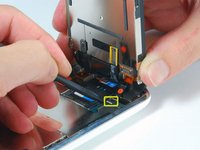
Remove the metal handle from the suction cup. It's easier and safer to grip the suction cup's base instead of the metal handle.
Be very careful when opening the iPhone so that the cables under the display are not severed.
There is a rubber gasket between the silver front bezel and black display assembly. A bit of force is required in this step to separate the iPhone's display assembly.
Use a small suction cup near the Home button to gently pull up the bottom portion of the iPhone's display assembly.


Press the metal spudger between the chrome bezel and the screen, than use the suction cup.
iFixit Staff
Using a metal spudger might damage the bezel and/or screen. It's definitely doable to separate the two without a metal spudger - I did it myself with no problems - but other iPhone display assemblies may be tougher than the one I took apart.
When reassembling the display and bezel, how should one install the gasket? What happens if the gasket is damaged while the phone is being disassembled? Is there a replacement or some other fix?
Hello everyone -- what kind of adjustments, if any, can be made in this step to ensure that the display sits flush with the bezel around all edges when installed? On my iphone, the display is a tiny bit uneven when installed, i.e. the glass is ever so slightly higher than the bezel on the left side, while the glass it just a hair bit lower than the bezel on the right side. Thanks!
Success!
i had to spend quite a bit of time (30 minutes) on the hair dryer/heat up step to gently heat then gently loosen the adhesive holding the front glass to the rather fragile frame.
after successfully removing the glass (and shards of glass from my broken screen) i also had some clean up to do to remove the excess glue and adhesive from both the top and bottom sections and also the rails. i used the "leaf" end of the metal spudger (not the oar shaped end) for awhile scraping up stray bits but also used a Q-tip dipped in some isopropyl ("rubbing") alcohol which helped dissolve some of the goo left in the corners and the crevices of the rails.
perhaps your screen sits a bit akimbo because you still have some goo in those rails?
I did every step but the screen doesn't work. Phone calls come in and its charging cause I hear the sounds. What might be the problme?
I've done it. The most difficult part was to separate the broken glass from the plastic structure. I've damage the thinner rubber on the top.
Everythig works fine except the GPS. After the repair my gps is not working like it was before. Now rarely gets a constant signal, and the most part the signal is week. Maybe i have damage the antena ?
Any ideas ? It is possible that the adhesives strips can block the signal ?
Thank you very much.
My screen was to busted-up for the suction cup to adhere, so I stuck a piece of (wide) clear packing tape to the front of the glass, which provided sufficient surface area for the cup to create a solid seal.
Time to complete the repair: ~60 minutes
Try connecting the phone to iTunes and doing a restore. I had the same problem and that fixed it
Hey guys in step two they used a suction cup to remove the screen. Yet my iphone screen is shattered all through out and the cup who stay due to air coming through the glass. Any ideas or work arounds?
Duct tape or 3m double sided tape should do the juob. I had the same problem and solved it with taking a piece of duct tape folding it onto itself and leaving about and inch still undone. I pushed the ens own onto the glass and used the center as a handle. Imagine two capital L's back to back to get an idea of what I am talking about.