Introduction
Instructions on how to replace a defective Sega Dreamcast power supply with a working power supply.
What you need
-
-
Flip the console over on its back.
-
Take note of your model number, in case replacement parts are needed.
-
-
-
-
Locate and remove all four black 12mm Phillips #02 screws from the underside of the console.
-
-
-
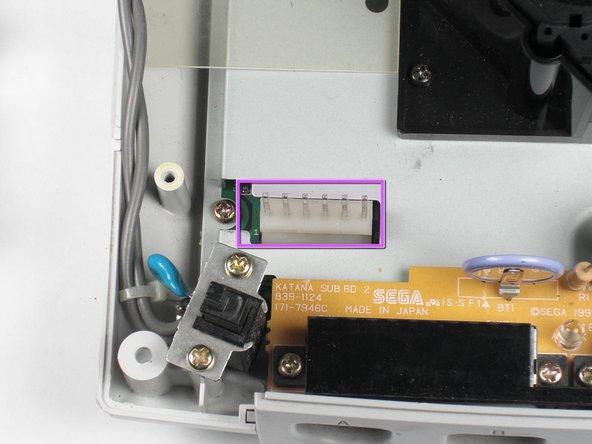
Remove the white female pin head by pinching and lifting directly up on the harness.
-
Remove the two Philips #02 screws from the board.
-
Remove the power board. Using both hands, gently lift the power board away from the console without damaging the male pin head
-




To reassemble your device, follow these instructions in reverse order.
To reassemble your device, follow these instructions in reverse order.
Cancel: I did not complete this guide.
6 other people completed this guide.


Team

Cal Poly, Team 5-1, Regan Fall 2009 Member of Cal Poly, Team 5-1, Regan Fall 2009
CPSU-REGAN-F09S5G1
5 Members
21 Guides authored
