Introduction
Restore sound to your laptop by replacing the speakers.
What you need
-
-
Orient the computer so that the side with the line of screws on it is away from you.
-
Use your thumbs to push both battery release tabs away so that the edge of the battery lifts up.
-
Lift the battery out of the computer.
-
-
-
Loosen the trackpad connector by pulling the locking bar toward the battery housing, using the tips of your fingers.
-
Slide the trackpad cable out of the loosened connector.
-
Note: When reassembling the case, the trackpad cable can get stuck below the slot to the motherboard. It's possible to nudge it out slowly by gently prodding it on either side with a small screwdriver. You don't need to use much force to do this. Eventually it will just pop back out and you can reconnect as per the instructions above. Also, note that the locking bar comes loose so if you see a little piece of plastic lying around when reassembling, that's what it is. :)
-
-
-
Remove the following 10 screws from the bottom case:
-
Three 1.7 mm Phillips from the front edge of the battery compartment.
-
One 3.9 mm T8 Torx to the right of the memory card.
-
One 6.9 mm T8 Torx at the left edge of the memory compartment.
-
Three 12.4 mm fully threaded Phillips from the center of the row of screws along the back edge of the case.
-
Two 15.1 mm 2.5 mm threaded Phillips, one from either end of the row of screws along the back edge of the case.
-
-
-
-
Use the method described in the step for disconnecting the keyboard ribbon to loosen the connector on the DC-In board.
-
Pull the cable free of the loosened connector.
-


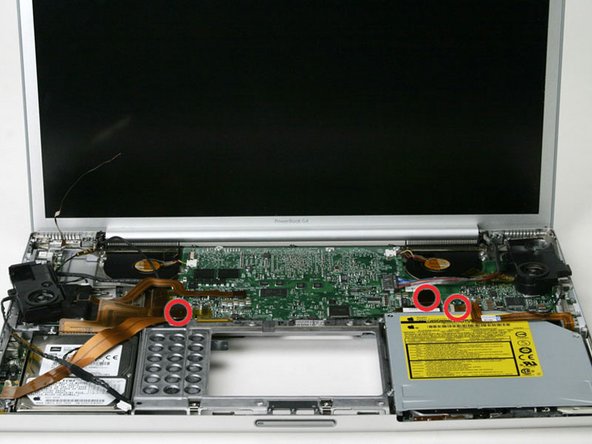

To reassemble your device, follow these instructions in reverse order.
To reassemble your device, follow these instructions in reverse order.
Cancel: I did not complete this guide.
One other person completed this guide.


