Introduction
Use this guide to replace the plastic frame around your MacBook Core Duo's LCD.
What you need
-
-
Remove the three evenly-spaced Phillips screws from along the rear wall of the battery compartment.
-
-
-
Remove the following 3 screws:
-
One 11 mm Phillips #00 in the middle of the case.
-
Two 14.5 mm Phillips #00.
-
-
-
Starting near the display and working around to the front of the computer, pry up on the upper case. It is held with clips on the right above the optical drive. These will release with some firm lifting pressure.
-
Be careful when prying up the upper case. It's very easy to slice open a fingertip and thus provide the blood sacrifice the Mac gods sometimes require of those who insist on doing their own repairs.
-
-
-
Grasp the white plastic tab attached to the hard drive and pull it to the left, removing the hard drive from the computer.
-
-
-
-
Remove the following 3 screws:
-
Two 3 mm Phillips near the right speaker.
-
One 6 mm Phillips threaded through a hole in a plastic finger above the subwoofer.
-
-
-
Use a spudger to carefully disconnect the microphone cable from the logic board. You'll want to work from side to side, and slowly wiggle the connector out of its socket.
-
-
-
Hold the display with one hand while removing the screws from the left hinge mount.
-
Remove the following 3 screws from the left hinge mount:
-
One 6 mm smaller diameter Phillips from the right side.
-
One 6 mm larger diameter Phillips from the middle.
-
One 10 mm Phillips from the left side.
-
Lift the left hinge mount out of the computer.
-
-
Tool used on this step:Plastic Cards$2.99
-
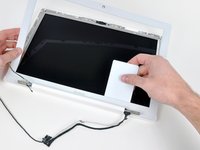
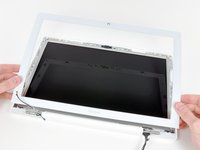
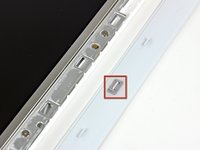
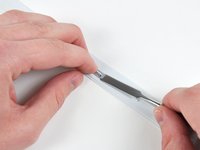
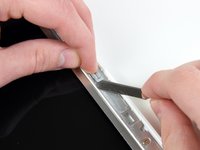
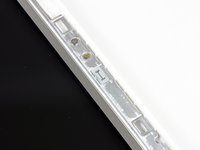
Use a thin plastic card to release the tabs and their clips holding the front display bezel to the display assembly. There are five tabs along the left side of the display bezel.
-






To reassemble your device, follow these instructions in reverse order.
Cancel: I did not complete this guide.
30 other people completed this guide.


4 Guide Comments
This may be a lame question but is it completely necessary to do steps 1-34? Can we simply remove the bezel with out taking off the display?
You're right, most of these steps are irrelevant. You can easily just pop it off. You can do 36-40 without taking apart the whole computer. just start on the lower sides. I did it yesterday. It's really easy.
Allison -
I don't mean to insult this guide. But you can definitely take the bezel screen frame off without taking apart the whole computer. It's not attached to anything other than the bezels. Just start at the bottom sides and go from there. This guide could definitely be simplified. You just need to do 36-40
You are right I just did mine yesterday, unknowingly with no prior knowledge, I fix a new display bezel without tempering with the top Case.
Cent Ci -
