Introduction
Upgrade or replace the combo or SuperDrive (requires a slim drive). Be sure to determine which model Macbook you have when installing new parts because earlier models have a PATA/IDE connection to the motherboard rather than SATA.
What you need
-
-
Unscrew the three evenly-spaced Phillips 000 screws from along the rear wall of the battery compartment.
-
-
-
Remove the following 3 screws:
-
One 11 mm Phillips#00 in the middle of the lower case. (Head: 5mm dia. x .75mm thick)
-
Two 14.5 mm Phillips #00 (Head: 5mm dia. x .75mm thick)
-
-
-
-
Grasp the white plastic tab attached to the hard drive and pull it to the left, removing the hard drive from the computer.
-
-
-
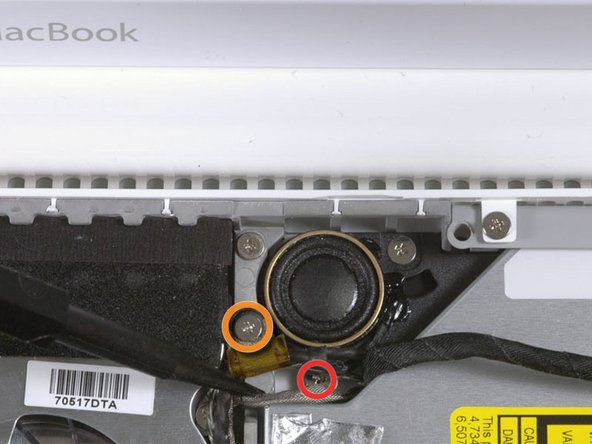
Remove the 2 mm Phillips #00 screw securing the rear corner of the optical drive.
-
The silver-jacketed Bluetooth cable may be covering the screw. If so, carefully push it aside. You may need to remove the screw holding the ground shield lugs for the two nearby cables before you can move the Bluetooth cable aside sufficiently. This screw is 7mm in earlier models, and may be 4.2mm in Santa Rosa/Penryn and 2009 models.
-
-
-
Lift the side of the optical drive closest to you, then slide the drive towards you, and up and out of the computer.
-
First, slide its side nearest to the rear of the Macbook under the edge of the rear frame to the left of the hinge, while also sliding the optical drive's mounting tab at its upper left corner under the cables at this location.
-
Lower the drive partially into the lower housing. Keep the hard drive cable away from the optical drive bay.
-
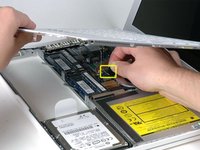
Before dropping the drive fully in place, use a spudger to push forward (towards the front of the drive) on the screw hole in the drive's mounting tab.
-
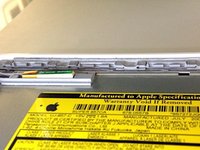
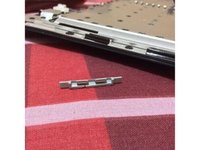
Push forward the slider, which runs along the far side of the drive, to insert the end of this slider into a small channel in the lower case's frame. This helps hold the drive in place.
-
-
-
Peel up the black tape partially covering the orange optical drive cable.
-
-
-
Use a spudger to carefully pry the silver metal bracket off the left side of the optical drive. Be careful not to bend the bracket, as it is very thin and bends easily. If the bracket doesn't come free easily, heating the adhesive may make prying the bracket off easier.
-






To reassemble your device, follow these instructions in reverse order.
Cancel: I did not complete this guide.
236 other people completed this guide.


11 Guide Comments
Thank you guys for a thorough job explaining this process of changing the optical drive. I replaced 3 totally on mine and 2 friends computers ......... Now it's totally easy and I'm thinking of taking up a little side business or fixing macs with your help!! I wish your parts were a little less expensive though.
