Introduction
Battery not lasting long? Swap it out (requires soldering).
What you need
-
-
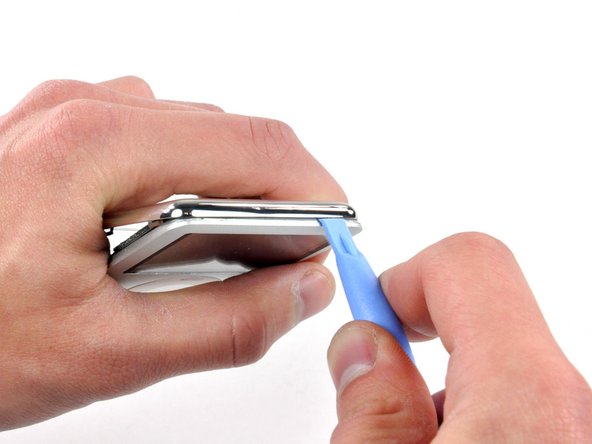
Insert a small iPod opening tool into the seam on the headphone jack side of the Nano, with the edge of the tool pointing toward the rear panel.
-
Gently enlarge the existing gap by pressing/wiggling the small iPod opening tool into the gap near each of the the two tabs attached to the rear case, pushing the clips toward the center of the Nano until both have been freed.
-
-
-
With the rear case removed, the back side of your Nano should now look like this.
-
-
-
-
Before proceeding, remove the metal EMI finger shown by pulling it away from the adhesive on the logic board.
-
-
-
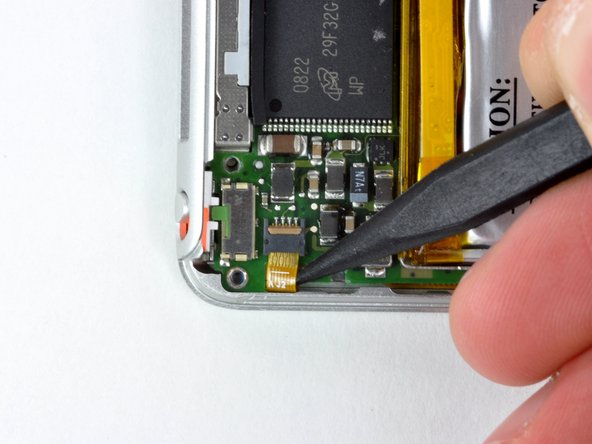
Push the tip of a spudger beneath the rubber adhesive and toward the battery to free it from the surface of the logic board.
-
Start freeing the adhesive from around one of the outer leads, then free it from the two gaps between leads, and finally push the spudger along the back side of the leads to completely remove it from the logic board/battery leads.
-
-
-
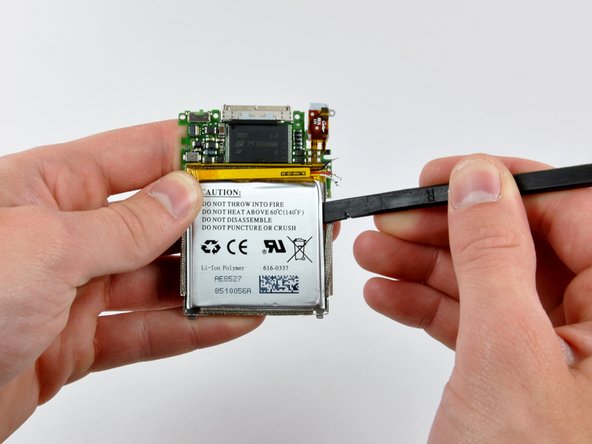
Using a spudger, pry the battery up from the adhesive holding it to the battery shield.
-
Start prying at the upper right corner of the battery and work your way around the perimeter until the battery has lifted enough to grab it with your fingers.
-
Remove the battery from the battery shield.
-
-
-
To open the solder holes, straighten out a staple and push it against the solder blocking the hole while simultaneously heating the same solder pad from the other side of the logic board.
-
-
-
Solder the connection by momentarily placing the tip of the soldering iron against the connection, pressing solder into the connection (melting it), and quickly removing both the solder and the tip of the soldering iron from the connection. The solder should flow around the new battery lead, solidly connecting it to the pad on the logic board.
-
Solder the other two battery leads in the same fashion, taking special care not to bridge any of the connections together with solder.
-








To reassemble your device, follow these instructions in reverse order.
To reassemble your device, follow these instructions in reverse order.
Cancel: I did not complete this guide.
117 other people completed this guide.


18 Comments
I have one suggestion about replacing the back cover after you are all done (If you did not purchase a new replacement cover). I noticed that in the process of removing the back cover, the metal clips get bent up. This causes the cover to be very loose when you replace it (this is the "considerable damage" I presume the article talks about. In order to get a tight fit, you must press down the clips very gently. One of the tack welds came off of mine, and I had to remove one of the metal tabs because it was useless, so be careful. Anyway, keep this in mind and you won't have to buy a new back cover. Thanks for the article, it really helped!
This is NO EASY TASK. Much HARDER than the steps shown here. There is no way in !@#$ the plastic tool will separate the case...but I am sure someone will say there is.
Not I though.
I will be purchasing the back case now since it is obvious to me after receiving the replacement battery in the mail that I am going to butcher this thing up and the clips.
Peace.
I totally agree, the plastic tool broke the tangs right away. I had to use a small flat blade jewelers screwdriver to pry around. And yes, I bought a new cover
Bud -
I successfully opened the ipod with a walmart brand set that contained a large and small plastic tool. You gotta work it.
