Introduction
Change out the entire display assembly, including the inverter, AirPort antenna, hinges and plastic casing.
What you need
-
-
Use a coin to rotate the battery locking screw 90 degrees clockwise.
-
Lift the battery out of the computer.
-
-
-
Pull the keyboard release tabs (shown in yellow) toward you and lift up on the keyboard until it pops free.
-
If the keyboard does not come free, use a small flathead screwdriver to turn the keyboard locking screw (shown in orange) 180 degrees in either direction and try again.
-
Flip the keyboard over, away from the screen, and rest it face-down on the trackpad area.
-
-
-
Close the display and flip the computer over.
-
Remove the three hex screws using a T8 Torx screwdriver.
-
-
-
-
Remove the following 10 screws from the bottom shield:
-
Six 3 mm Phillips
-
Three 7.5 mm Phillips
-
One 14 mm Phillips
-
-
-
Remove the following 11 screws from the bottom of the computer:
-
Three 3 mm Phillips around the battery compartment.
-
Three 4.5 mm Phillips along the optical drive bezel. (a magnetic screwdriver may help to lift these screws out)
-
One 12 mm Phillips in the lower right corner.
-
Four 14.5 mm Phillips.
-
-
-
Remove the following 16 screws:
-
Thirteen 3 mm Phillips.
-
One 3 mm Phillips.
-
Two 4 mm Phillips.
-
-
-
Remove the two Phillips screws at the corners of the modem.
-
Remove the two Phillips screws at the corners of the modem.
-
-
-
Remove the three 3 mm Phillips screws securing the AirPort card bracket to the framework.
-
Lift the AirPort card bracket up and out of the computer.
-


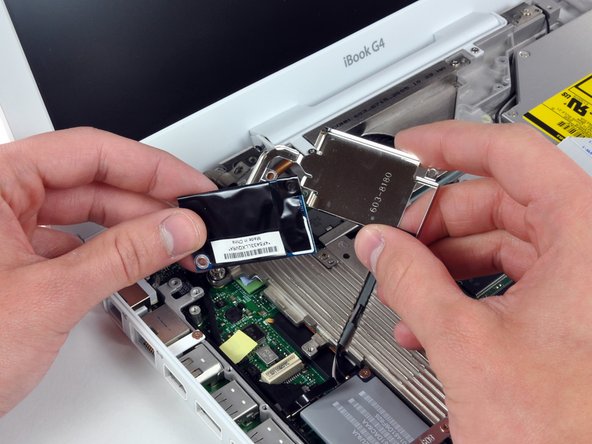


To reassemble your device, follow these instructions in reverse order.
To reassemble your device, follow these instructions in reverse order.
Cancel: I did not complete this guide.
14 other people completed this guide.
Attached Documents


2 Comments
Smooth as silk Walter. I am changing this to try and address a Black screen problem. After a Optical Drive and HD (OWC Legacy SSD) my machine went from perfect to normal boot then 28-30 secs later, black screen while everything else worked (caps lock light, pulsing sleep light, etc.) Will let you know if this solved the prob as I have a screen harvested years ago from a working iBook of mine.
Thanks
Nothing yet Walter. The past couple of weeks I have dismantled my iBook 14” 1.42 and put it back together a half dozen times or so. I’ve bought parts off of ebay, harvested stuff from my spare iBook and I am certain of this... It still loads as normal as can be. Bright screen, sound, etc. but 38 secs from first desktop view and 28-30 secs after complete load it gets a black screen.
I’ve checked or replaced: RAM, Inverter cable, HD, different display, and more. I’ve tried rushing to the sys prefs and setting it to “no sleep.” I’ve quickly opened a song in Quicktime and it shuts off with the screen goes black.
Any other suggestions from anyone would be great. I really dig my iBook and it was working fine until I replaced the Optical drive (now gone) and at one point I started it up with only the aluminum shields on and it worked fine. Then, after putting the cases back together, nothing since.
