Introduction
Use this guide to replace a broken front display bezel.
What you need
-
-
Pull the keyboard release tabs toward you and lift up on the keyboard until it pops free.
-
Flip the keyboard over, away from the screen, and rest it face-down on the trackpad area.
-
-
-
Use a pin (or anything you like) to remove the three rubber feet from the lower case.
-
-
-
-
Remove the following 7 screws from the edges of the keyboard area.
-
Three 2 mm Phillips along the right edge.
-
One 4.5 mm Phillips underneath where the magnet was.
-
One 6 mm Phillips with a small head in the lower left corner.
-
Two 6 mm Phillips with large heads, one in the upper left corner and one in the middle
-
-
-
Remove the following 15 screws:
-
Fourteen 3 mm Phillips.
-
One 5.5 mm Phillips in the upper left corner.
-
-
-
Turn the computer over.
-
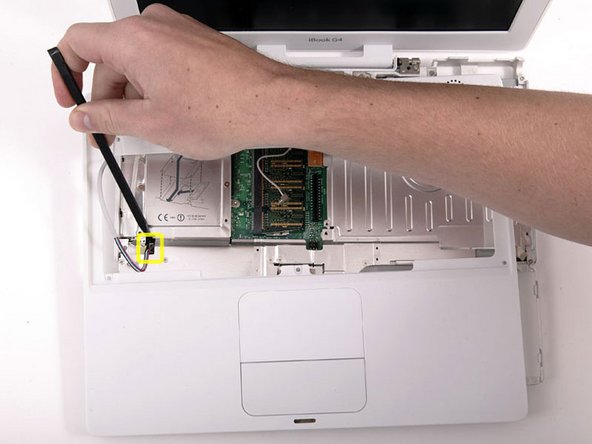
Disconnect the inverter cable from the logic board and deroute it from the metal framework, removing tape as necessary.
-
-
-
Use a 1.5mm hex screwdriver to remove the two hex screws on either side of the display (four screws total).
-
-
-
Remove the second of the two Phillips screws securing the clutch cover to the cast aluminum frame of the clutch hinges.
-
-
-
Remove the two pieces of tape over the display data/microphone cables near the lower edge of the display.
-
-
-
Remove the two pieces of tape covering the inverter/AirPort cables along the lower edge of the display.
-
-
-
Remove the six Phillips screws securing the clutch hinges to the front display bezel.
-
Lift the clutch hinges off the front display bezel.
-
-
-
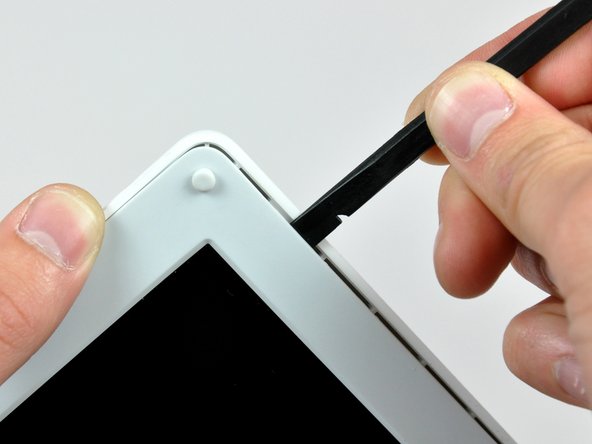
Insert the flat end of a spudger between the display inverter and the front display bezel near the center of the inverter.
-
Run the spudger along the length of the display inverter, separating it from the adhesive securing it to the front display bezel.
-
Lift the inverter out of the front display bezel.
-






To reassemble your device, follow these instructions in reverse order.
To reassemble your device, follow these instructions in reverse order.
Cancel: I did not complete this guide.
4 other people completed this guide.


