Introduction
Upgrade your RAM for an instant increase in speed.
What you need
-
-
Remove the following ten screws securing the lower case to the upper case:
-
Seven 3 mm Phillips screws.
-
Three 13.5 mm Phillips screws.
-
-
-
-
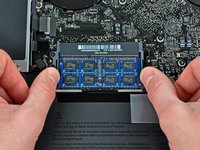
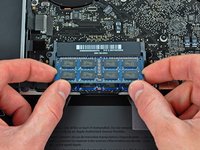
Release the tabs on each side of the chip by simultaneously pushing each tab away from the RAM.
-
After the RAM chip has popped up, pull it straight out of its socket.
-


To reassemble your device, follow these instructions in reverse order.
Cancel: I did not complete this guide.
160 other people completed this guide.


5 Guide Comments
I bought and installed 4GB x2 RAM for my Mid 2009 15 inch MacBook Pro and it was easy and is working great. Before this I had 4GB and it was being maxed out. It was very easy. I did purchase the required tools which made it simple. I also swapped the battery at the same time. I am writing this from the same computer and it is working well. Good luck!
I had no trouble installing the 4 GB RAM I bought for my Mid 2009 15 Inch MacBook Pro. The mistake I made though was not realising that my machine has two RAM slots. I only bought one chip! So now I have to buy another one.
If you read this before you buy some RAM, make sure you check how many slots your computer has!
Also, I must say the customer support from ifixit is great. I messaged them about this and some other issues I was having and I got a detailed response from them within a couple of days. Thanks guys!
I replaced my original 2x 2gb ram with 2x 4gb RAM following your instructions. However, upon boot up, it’s only showing 1 of the 2 4gb chips. Any tips on how to get both seated correctly?
Never mind. I was able to pop the second chip back out and get it seated properly.
