Introduction
Accessing the RAM in this computer is straightforward and requires minimal disassembly.
What you need
-
-
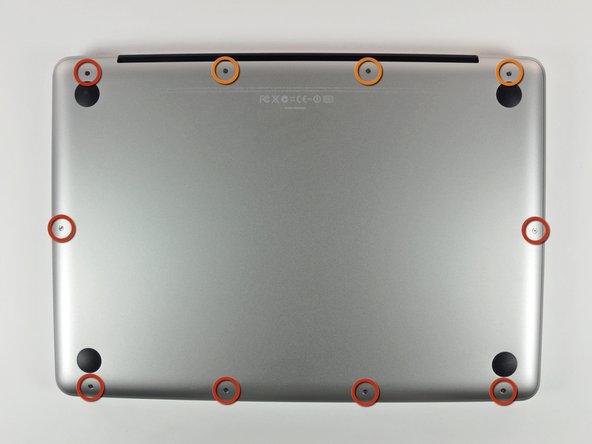
Remove the following 10 screws securing the lower case to the MacBook Pro 13" Unibody:
-
Seven 3 mm Phillips screws.
-
Three 13.5 mm Phillips screws.
-
-
-
Slightly lift the lower case and push it toward the rear of the computer to free the mounting tabs.
-
-
-
-
Use the flat end of a spudger to lift the battery connector up out of its socket on the logic board.
-
-
-
Release the tabs on each side of the chip by simultaneously pushing each tab away from the RAM.
-


To reassemble your device, follow these instructions in reverse order.
Cancel: I did not complete this guide.
378 other people completed this guide.


16 Guide Comments
I think something went wrong with mine at step 3.. after connecting back with new RAM.. Mac stopped working with battery... its working only on external power plug.. I rechecked it, googled it for SMC etc.. still no luck.. I did notice a small spark while removing for first time.. nothing after that.. even the LED indicator on the side with dots as battery indicaot is not working.. can someone help me please.. I'd say Step 3 is risky if it does these kind of things..
Alright so I did this step by step and removed one ram because my Mac. Wasn't turning on and beeping, after removing the top ram it did turn on but now my keyboard is not working and my trackpad is lagging
