Introduction
Replace the aluminum bottom case in a MacBook Pro 13" Unibody.
What you need
-
-
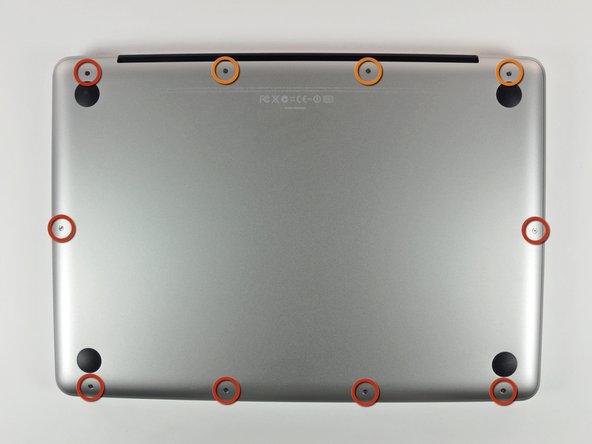
Remove the following 10 screws securing the lower case to the MacBook Pro 13" Unibody:
-
Seven 3 mm Phillips screws.
-
Three 13.5 mm Phillips screws.
-
-
-
-
Slightly lift the lower case and push it toward the rear of the computer to free the mounting tabs.
-

To reassemble your device, follow these instructions in reverse order.
To reassemble your device, follow these instructions in reverse order.
Cancel: I did not complete this guide.
53 other people completed this guide.


One Comment
2 tornillos se da&aron, los q estan al lado de las lenguetas de montaje -lado de la bateria- pues la bateria se inflo y presiona la carcasa
q haces p resolver ??
