Introduction
Use this guide to completely replace your logic board.
What you need
-
-
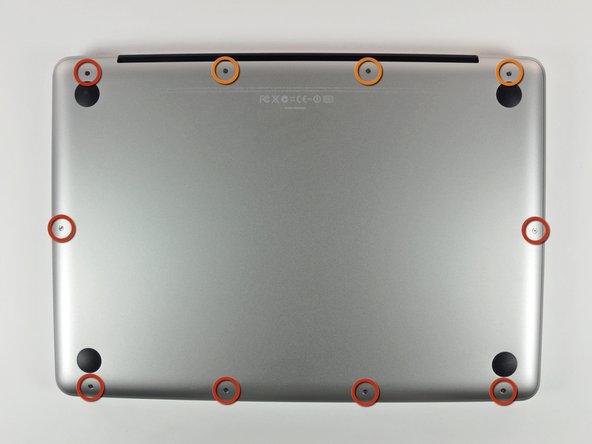
Remove the following 10 screws securing the lower case to the MacBook Pro 13" Unibody:
-
Seven 3 mm Phillips screws.
-
Three 13.5 mm Phillips screws.
-
-
-
Slightly lift the lower case and push it toward the rear of the computer to free the mounting tabs.
-
-
-
Use the flat end of a spudger to lift the battery connector up out of its socket on the logic board.
-
-
-
Use a spudger to pry the fan connector out of its seat, and straight up off the logic board.
-
-
-
Grab the plastic pull tab secured to the display data cable lock, and rotate it toward the DC-in side of the computer.
-
Pull the display data cable connector straight away from its socket, towards the DC-in side of the computer.
-
-
-
-
Remove the four 8.5 mm Phillips screws securing the heat sink to the logic board.
-
-
-
Peel off the tape covering the microphone cable connector and left speaker cable connector.
-


To reassemble your device, follow these instructions in reverse order.
Cancel: I did not complete this guide.
103 other people completed this guide.


3 Guide Comments
Vielen vielen Dank, dank dieser top beschriebenen Anleitung hab ich mein MacBook wieder in Gang und funktionstüchtig machen können, vor allem die Schrauben Bezeichnung mit Längenangaben, haben in ein großes Wirrwar Ordnung gebracht. Sehr gut, Top 100%?
vielen Dank
Das freut mich, dass du dein MacBook wieder zum laufen gebracht hast. Viel Spaß damit!
