Introduction
This guide will show you how to replace the SuperDrive from your laptop (requires a SATA SuperDrive).
What you need
-
-
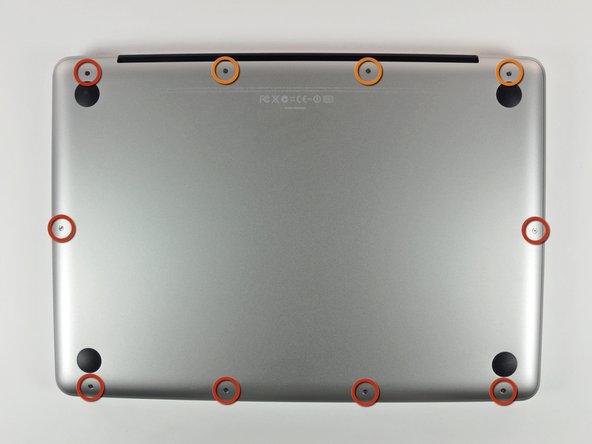
Remove the following 10 screws securing the lower case to the MacBook Pro 13" Unibody:
-
Seven 3 mm Phillips screws.
-
Three 13.5 mm Phillips screws.
-
-
-
Slightly lift the lower case and push it toward the rear of the computer to free the mounting tabs.
-
-
-
Use the flat end of a spudger to lift the battery connector up out of its socket on the logic board.
-
-
-
Using the flat end of a spudger, gently pry the right speaker/subwoofer cable connector straight up off the logic board. Be careful not to lift the socket. Pull the connector toward the optical drive.
-
-
-
-
Remove the optical drive cable by pulling it straight away from the optical drive.
-
-
-
Remove the two black Phillips #0 screws securing the small metal mounting bracket. Transfer this bracket to your new optical drive or hard drive enclosure.
-


To reassemble your device, follow these instructions in reverse order.
Cancel: I did not complete this guide.
103 other people completed this guide.


2 Guide Comments
iFixit rocks! Got a stuck CD out of my wife's superdrive this way. Many thanks!!!
I just took mine apart and found a piece of tape in it. Smh. Works perfect now.
