Introduction
Use this guide to replace the upper case, including the backlit keyboard, but without replacing the TrackPad.
What you need
-
-
Use a P5 Pentalobe driver to remove ten screws securing the lower case, of the following lengths:
-
Two 9 mm screws
-
Eight 2.6 mm screws
-
-
-
Grab the clear plastic pull tab attached to the battery connector and pull it toward the front edge of the Air to disconnect the battery from the logic board.
-
-
-
Use the flat end of a spudger to pry the I/O board cable connector upward out of its socket on the I/O board.
-
-
-
Use the tip of a spudger to carefully flip up the retaining flap on the fan cable ZIF socket.
-
-
-
Disconnect the I/O board by pulling the power cable away from its socket on the logic board.
-
-
-
-
Remove the following five screws securing the battery to the upper case:
-
Three 6.3 mm T5 Torx screws
-
Two 2.4 mm T5 Torx screws
-
-
-
Use the tip of a spudger or your fingernail to flip up the retaining flap on the trackpad ribbon cable ZIF socket.
-
Be sure you are prying up on the hinged retaining flap, not the socket itself.
-
-
-
Gently push the tip of a spudger under the black plastic flap stuck to the display data cable lock to make the lock pop upward and away from the socket.
-
While holding the lock away from the socket, use the tip of a spudger and your fingers to gently remove the display data cable from its socket.
-
-
-
Gently de-route the antenna cables out of the channel cut into the upper case.
-
-
-
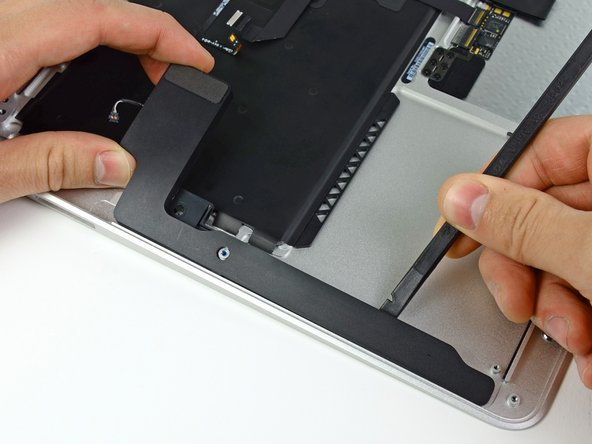
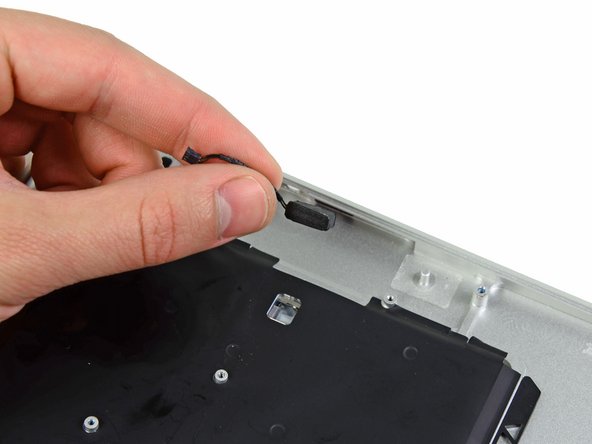
Use the flat end of a spudger to pry the right speaker off the adhesive securing it to the upper case.
-
Remove the right speaker from the upper case.
-
-
-
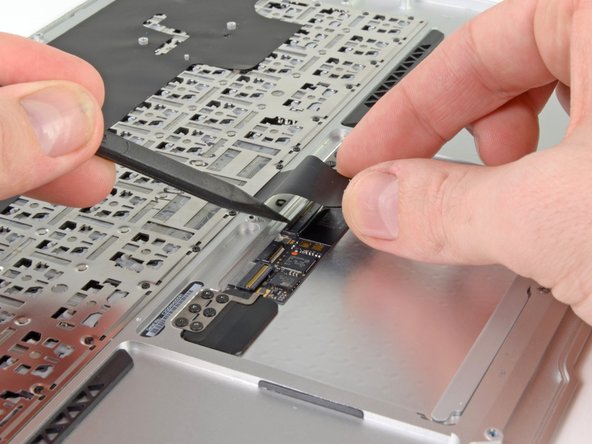
Use the tip of a spudger or your fingernail to flip up the retaining flap on the trackpad ribbon cable ZIF socket.
-
Pull the trackpad ribbon cable straight out of its socket toward the rear edge of the Air.
-








To reassemble your device, follow these instructions in reverse order.
To reassemble your device, follow these instructions in reverse order.
Cancel: I did not complete this guide.
81 other people completed this guide.



16 Comments
question for anyone...just did step 14, and accidentally pried the whole microphone cable box out of the board. Any way to put that back in or did i just lose microphone capability?
You can resolder it back on or carefully use a hot-air rework station and Kapton tape to protect the surrounding area.
This guide is truly SPOT-on!!
I went to my local Fry's Electronics and purchased a Pro's Kit branded "Consumer Electronic Equipment Repair Kit" that had all the necessary bits and tools needed for US$35.
No need to spend $250 for a new upper case, I figured: what did I have to loose?
I found a brand new keyboard $45.95 (included priority shipping) from MCCComputers.com
Steps: Remove keyboard:: CAREFULLY, remove all #000 Philips head screws around the outside edge of the keyboard on the logic board side of top case. Then, i started at one end, four keys at a time and started rocking around the four corners and pressing firmly in sections (from the side where you usually type on the keys, inward) until the rivets started popping out. MAKE SURE YOU ARE DOING THIS IN AN ENVIRONMENT THAT IS CLEAN and SMOOTH SURFACES. They go everywhere!
Reassembly:use 3M #77 adhesive spray on the aluminum casing to reattach and make up for lost rivets. Snap in rivets with flat end of T-15 bit and screw-in edge screws.
Step 9
On reassembly with a new upper case I spent a long time trying to replace the red-circled screw to hold the fan. After a while I figured out that the new case I purchased from IFIXIT had a small screw already inserted in the socket. Once I removed this extra part everything went smoothly.
THAT’S why I ended up with an extra screw!
I agree, this guide is great. Was able to skip the last few steps, as my replacement upper case was already assembled.
