Introduction
This guide shows how to remove the hard drive from an iPod Video.
What you need
-
-
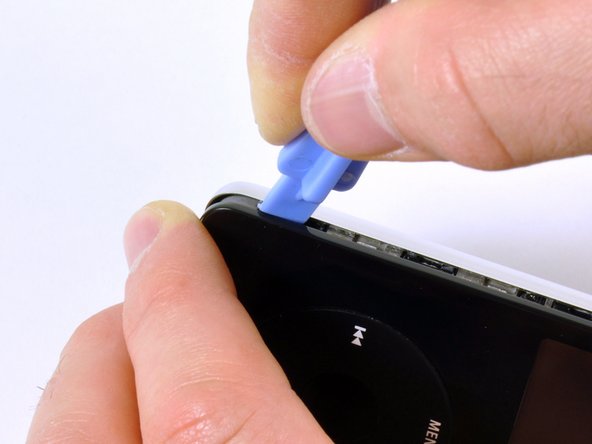
Insert the iPod opening tool into the left side of the iPod, with the edge of the tool pointing towards the metal back.
-
A small guitar pick can be extremely helpful in opening the iPod. Simply insert it and slide the pick around the case to free the clips to streamline the process.
-
Gently enlarge the existing crevice by wiggling the iPod opening tool and moving it to the left.
-
Continue doing so until the entire side of the iPod is loose.
-
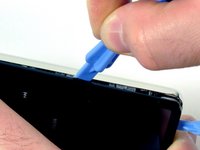
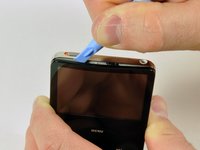
You can then insert an iPod opening tool to the right of the Hold button. Be very careful while inserting the tool, as the display is very fragile.
-
-
-
-
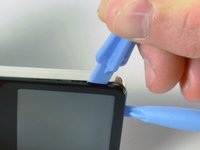
Gently glide the iPod opening tool on the top of the display, making sure to free the retaining clips.
-
The other sides of the iPod should now easily come loose. If they do not, use iPod opening tools on the right side of the iPod in the same way as on the left side of the iPod.
-
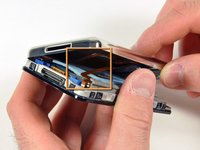
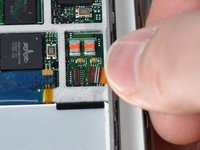
Separate the front of the iPod from the back about an inch (or a couple of centimeters).
-
-
Tool used on this step:Tweezers$3.99
-
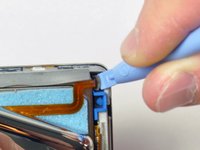
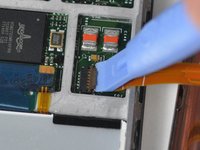
Use angled tweezers or an iPod opening tool to slide up the brown connector latch, holding the orange battery ribbon cable in place. Make sure you pull from both sides of the latch. You only need to lift the brown connector latch up about 1-2mm to free the cable. Do not lift more or remove the latch, or you might pull the white connector with it!
-
Remove the cable from the connector.
-
-
-
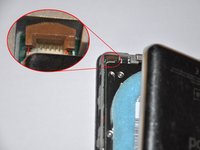
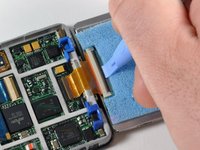
Use a small iPod opening tool to release the black hinge holding the hard drive ribbon cable. The tab will rotate up 90 degrees towards the logic board, releasing the ribbon cable.
-
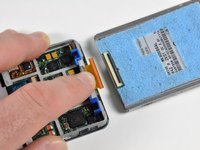
Use your forefinger to hold the ribbon cable in place; disconnect the drive from the ribbon cable.
-












To reassemble your device, follow these instructions in reverse order.
Cancel: I did not complete this guide.
235 other people completed this guide.


9 Guide Comments
Okay, I apparently did the same thing as Jeff above. When I opened the case, the plastic front came off cleanly, but now I can't figure out how to pry the innards out of the metal casing, which apparently was supposed to just happen by itself, according to the instructions above.
I've tried very gingerly pulling and prying around the edges to see if I can dislodge the metal casing, but no such luck so far. Now what?
Guide was helpfull and well detailed. The screewed on parts from the black cover broke but what the !&&*, it's not like i need them now. I switched the battery without problems, everything from the guide is well detailed.
Buttons wont work now. Re opened it 4 times and buttons still wont work.
Threw this Apple Crap at my wall, now it's all opened up again, permanently!
Guide is perfect tho! Thanks for the help.
I saved myself about $400 (that is on the cheap end of a new iPod 7th gen on Amazon) by buying new hard drive for $25, buying a new battery that came with iPod repair tool for $7.99 (all on Amazon), and used this guide. I had no problems with disassembly and reassembly. This guide is fantastic!
With this guide i managed to save some bacon on my two 5th generation iPods. One black and one white. Just for 25E i managed to find replacement hard disks for them. Now i enjoy the music in both car and living room. Thanks again mate... Cheers from Greece.
I decided to fix my boyfriends ipod video(5th gen 60gb) for his Christmas present. He dropped it a while back and the hard drive went to crap. So I got all my parts and tools today(very quick shipping btw) and decided to go for it. I was a little intimidated at first since I've never done this before but everything was so easy. Had no problem opening or separating the case. Changed the battery while I was in there and that was easy. Got to the hard drive and got it done. Before closing I checked that it was working but it just hung out on the apple screen. Was a little worried that the new hard drive was bad so I disconnected and the reconnected it and it worked perfectly! So proud of myself! All in all, the guide was a huge help, and it only took about 45 minutes to do everything. Easy peasy. Now I know I can change the battery in my ipod with no problem. Thanks!!!
