Introduction
Battery not lasting long? Swap it out.
What you need
-
-
Before opening your iPod, ensure that the hold switch is in the locked position. The orange bar should be visible, indicating hold is active.
-
-
-
Insert an opening pick as far as possible into the seam between the plastic front and the metal rear panel, on the right edge of the iPod.
-
Use the opening pick to pry up against the plastic front panel and release five retaining tabs (seen in the third photo).
-
Slide the pick along the edge of the iPod and continue prying to release the rest of the retaining tabs.
-
After all five tabs along the right side are free, the case should open easily.
-
-
-
-
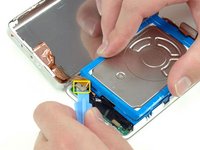
Lift up the hard drive with one hand and carefully disconnect the hard drive ribbon from the logic board.
-
Lift the hard drive out of the iPod.
-


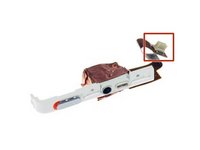


To reassemble your device, follow these instructions in reverse order.
Cancel: I did not complete this guide.
328 other people completed this guide.


19 Guide Comments
If you are real careful you don't have to remove the Torx screw to get the battery out.
I found this quite easy. The tools worked great. I agree with Andy, if you push the tool into the groove, then lift or pry it up so the tip of the tool is down inside the back cover, you should be able to slide it across to pop the clips quite easily. Once you get the first two sides open, it goes quick.
I also did this without having to remove the Torx screw. It helped to lift the battery up a bit to give the wires a little slack, and then just feed them around the corner of the motherboard. Putting the new battery in, I just fed the wires around the corner, and used the opening tool to push them the final bit of the way around the corner.
My old iPod is like new now! Hours and hours of battery life, when it would previously die after 5 minutes.
Very simple and clear guide. I managed to replace the battery in the first try and it worked!
I was able to do it without disconnecting the headphone jack and without removing the Torx screw.
I found the replacement battery to be a little thicker than the original battery but there was no issue resealing the case.
