Introduction
Use this guide to replace your iPhone's upper antenna.
What you need
-
-
Power off your iPhone before beginning disassembly.
-
Remove the two 3.6 mm Pentalobe P2 screws next to the dock connector.
-
-
-
Remove the following screws securing the battery connector to the logic board:
-
One 1.7 mm Phillips screw
-
One 1.5 mm Phillips screw
-
-
-
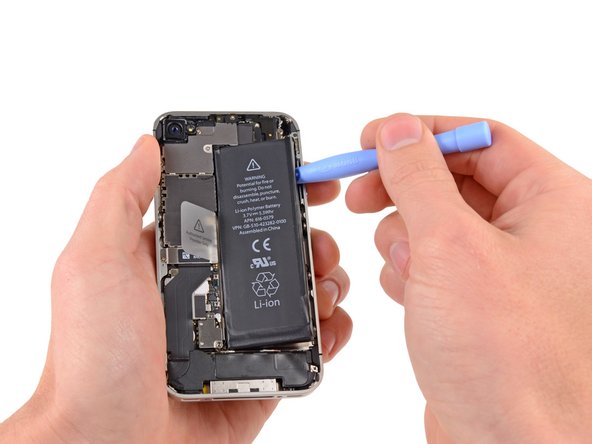
Insert the edge of a plastic opening tool between the battery and the outer case near the bottom of the iPhone.
-
Run the plastic opening tool along the right edge of the battery and pry up at several points to completely separate it from the adhesive securing it to the outer case.
-
Wait about one minute for the alcohol solution to weaken the adhesive.
-
Use the flat end of a plastic opening tool to gently lift the battery.
-
-
-
Remove the following screws securing the dock connector cable cover to the logic board:
-
One 1.5 mm Phillips screw
-
One 1.2 mm Phillips screw
-
Remove the metal dock connector cable cover.
-
-
-
-
Use a SIM eject tool or a paperclip to eject the SIM and its tray.
-
Remove the SIM and its tray.
-
-
-
Remove the five cables near the top of the logic board in the following order:
-
Headphone jack/volume button cable
-
Front facing camera cable
-
Digitizer cable
-
Display data cable
-
Power button cable (located underneath the headphone jack/volume button cable as shown in the second picture.)
-




To reassemble your device, follow these instructions in reverse order.
To reassemble your device, follow these instructions in reverse order.
Cancel: I did not complete this guide.
88 other people completed this guide.


14 Comments
where can u buy this piece, Ive been searching for about an hour now, a friend of mine tried to fix their phone and ripped this piece off... no idea how... any help?
The guide is very good and I succeeded in opening the iphone and fixing back again all the parts. Unfortunately, the wi-fi module still doesn't work, I don't know why. Anyway, many thanks to all ifixit staff, since they are helpful, efficient and kind. Alberto from Italy
Just completed replacing the battery and the wifi antenna. Went swimmingly. Thanks for the great directions. You guys rock! This fixed my 4s wifi grayed out issue. One thing to note, they wifi antenna needs to click into the socket to get a good connection. Put it together without checking this the first time and, no go.... Opened it up and made sure the connection was good and wahlah... AWSOME!
Hello, I had the issue with the grayed out wifi button. I replaced the upper antenna and the cellular antenna. When I turned on the phone the wifi was still greyed out. Does anyone has any other suggestions how I could possibly fix it.
Thanks
