Installing iPhone 4S Rear Camera

Removing your iPhone 4S' 8 MP rear camera.

  • Add Note x
  • x 4

Use this guide to remove the iPhone's primary rear camera.

first image

Add Note Edit Step 1 — Rear Panel  ¶ 

  • Before disassembling your iPhone, be sure it is powered off.

  • Remove the two 3.6 mm Pentalobe screws next to the dock connector.

  • During reassembly, we recommend you replace the 5-point screws with equivalent Phillips screws. Our Liberation Kit provides the tools and screws needed to replace the Pentalobe screws with Phillips screws.

  • The 5-Point Screwdriver should only be used once, as it has the potential to strip the screws.

first image
thumb image 1
thumb image 2

Add Note Edit Step 2  ¶ 

  • Push the rear panel toward the top edge of the iPhone.

  • The panel will move about 2 mm.

first image

Add Note Edit Step 3  ¶ 

  • Pull the rear panel away from the back of the iPhone, being careful not to damage the plastic clips attached to the rear panel.

  • Remove the rear panel from the iPhone.

first image

Add Note Edit Step 4 — Battery  ¶ 

  • Remove the following screws securing the battery connector to the logic board:

    • One 1.7 mm Phillips screw

    • One 1.5 mm Phillips screw

first image

Add Note Edit Step 5  ¶ 

  • Use a pair of tweezers or an opening tool to remove the pressure contact near the battery connector.

  • When reinstalling the pressure contact, be sure to clean it with a degreaser such as windex or isopropyl alcohol. The oils on your fingers have the potential to create wireless interference.

first image

Add Note Edit Step 6  ¶ 

  • Use the edge of a plastic opening tool to gently pry the battery connector up from its socket on the logic board.

first image
thumb image 1
thumb image 2

Add Note Edit Step 7  ¶ 

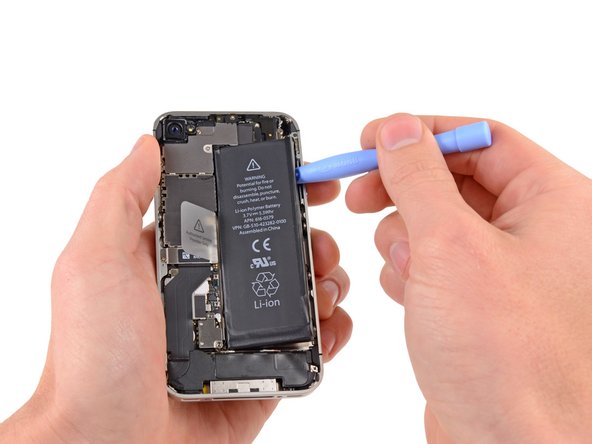
  • Insert the edge of a plastic opening tool between the battery and the outer case near the bottom left corner of the iPhone.

  • Run the plastic opening tool along the right edge of the battery and pry up at several points to completely separate it from the adhesive securing it to the outer case.

first image
thumb image 1
thumb image 2

Add Note Edit Step 8  ¶ 

  • Use the exposed clear plastic pull tab to peel the battery off the adhesive securing it to the iPhone.

  • Remove the battery.

first image

Add Note Edit Step 9 — Rear Camera  ¶ 

  • If necessary, use a pair of tweezers to remove the outer plastic ring located on top of the rear camera's flash assembly.

first image

Add Note Edit Step 10  ¶ 

  • Remove the following four screws securing the cable cover to the logic board:

    • One 2.7 mm Phillips screw

    • One 2.6 mm Phillips screw

    • One 1.3 mm Phillips screw

    • One 1.2 mm Phillips screw

first image
thumb image 1
thumb image 2

Add Note Edit Step 11  ¶ 

  • Use the edge of a plastic opening tool to pry the cable cover tabs out of their slots cut into the EMI shield on the logic board.

  • Lift the cable cover from its edge nearest the top and remove it from the iPhone.

first image
thumb image 1
thumb image 2

Add Note Edit Step 12  ¶ 

  • Use the edge of a plastic opening tool to pry the rear camera connector up from its socket on the logic board.

  • Be careful not to break any components off the surrounding area on the logic board as you pry upwards.

  • Remove the rear camera from the iPhone.

To reassemble your device, follow these instructions in reverse order.

For more information, check out the iPhone 4S device page.

Did you successfully follow this guide?

This guide has been completed 4 times.

Comments Add Note Comments are offturn on