Installing iMac Intel 27" EMC 2429 Glass Panel

Replace the glass panel on an iMac Intel 27" EMC 2429.

  • Add Note x
  • x 4

This guide will help you replace the glass panel.

Image #1 Image #2 Image #3

Add Note Edit Step 1 — Glass Panel  ¶ 

  • Stick a suction cup near each of the two top corners of the glass panel.

  • To attach the suction cups we sell, first position the suction cup with the movable handle parallel to the face of the glass panel (as highlighted in the first and second pictures).

  • While lightly holding the suction cup against the glass, raise the movable handle until it is parallel with the other handle (as highlighted by the third picture).

  • If your suction cups refuse to stick, try cleaning both the glass panel and the suction cup with a mild solvent.

Image #1 Image #2 Image #3

Add Note Edit Step 2  ¶ 

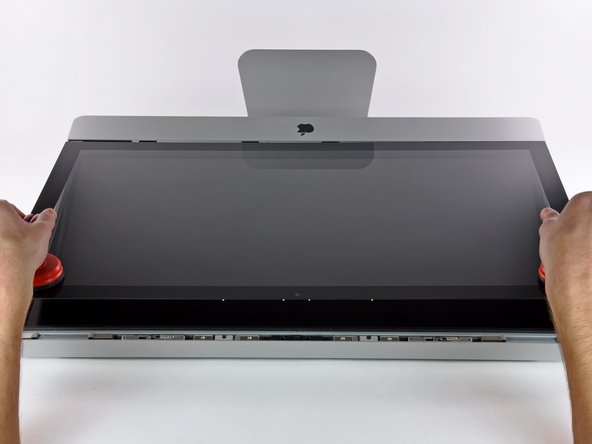
  • Gently lift the glass panel perpendicular to the face of the LCD enough to clear the steel mounting pins attached along the underside of the top edge of the glass panel.

  • Pull the glass panel away from the lower edge of the iMac and carefully set it aside.

  • During reinstallation, be sure to meticulously clean the inside of the glass panel and the face of the LCD as any dust or fingerprints trapped inside will be annoyingly visible when the machine is turned on.

Required Tools

Heavy-duty Suction Cups (Pair)

$14.95 · 50+ In stock

Popular Products

iPhone 4S Replacement Battery

$29.95 · 50+ In stock

Metal Spudger

$2.95 · 50+ In stock

T5 Torx Screwdriver

$6.95 · 50+ In stock

Comments Add Note Comments are offturn on