Installing iMac Intel 24" EMC 2111 PRAM Battery

Replace a dead PRAM battery on your iMac Intel 24" EMC 2111.

Use this guide to replace a dead PRAM battery.

Sections
Image #1 Image #2

Add Note Edit Step 1 — Access Door  ¶ 

  • Loosen the two Phillips screws securing the access door to your iMac.

  • Both screws remain captive within the access door.

  • Remove the access door.

Image #1

Add Note Edit Step 2 — Front Bezel  ¶ 

  • Remove the following screws along the lower edge of your iMac:

    • Three 6 mm T8 Torx screws

    • One 8 mm T8 Torx screw

Image #1 Image #2

Add Note Edit Step 3  ¶ 

  • Lay your iMac stand-side down on a flat surface.

  • To lift the front bezel off the iMac, simultaneously:

    • Use your thumbs to press in the RAM arms and hold the iMac down.

    • Use your index fingers to pull the small bridge of material on the front bezel toward yourself.

    • Pull the front bezel up with your index fingers.

  • Once the small bridge of material has cleared the RAM arms, lift the front bezel by its lower edge just enough to clear the bottom edge of the rear case.

Image #1 Image #2 Image #3

Add Note Edit Step 4  ¶ 

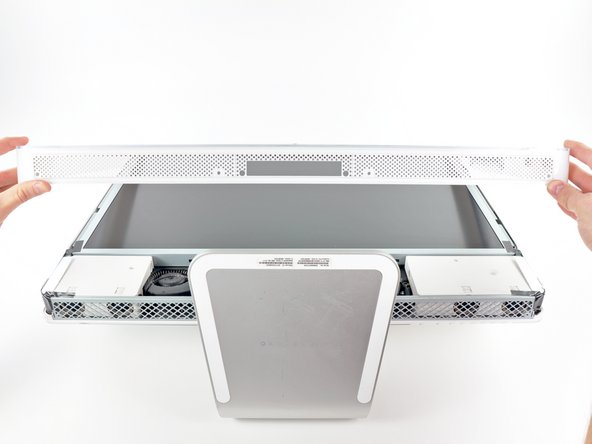
  • Lift the front bezel off the rear case and rotate it away from the bottom edge of the iMac, minding the camera and microphone cables still attached to its upper edge.

  • The third picture shows the top front bezel brackets and their slots cut into the top edge of the iMac's rear case.

  • Do not completely remove the front bezel, as it is still attached by the camera/microphone cables.

Image #1

Add Note Edit Step 5  ¶ 

  • If necessary, remove the strip of tape covering the microphone cable connector.

  • The microphone connector is located near the inside of top edge of your iMac.

Image #1 Image #2 Image #3

Add Note Edit Step 6  ¶ 

  • Disconnect the microphone cable.

  • Disconnect the camera cable by pulling its connector away from the socket on the camera board.

  • The camera cable connector and socket are delicate and easily bent. Remove with caution.

Image #1 Image #2

Add Note Edit Step 7 — PRAM Battery  ¶ 

  • Use the tip of a spudger to pry the PRAM battery out of its socket on the logic board.

  • Remove the PRAM battery.

  • Be sure to replace the battery with a new CR2032 Lithium battery cell.

Required Tools

T8 Torx Security Bit Screwdriver

$6.95 · 50+ In stock

Spudger

$2.95 · 50+ In stock

Phillips #1 Screwdriver

$4.95 · 27 In stock

Recommended Tools

Universal Drive Adaptor

$29.95 · 50+ In stock

iFixit Lock Pick Set

$29.95 · 8 In stock

Inspection Scope

$39.95 · 37 In stock

Frictionless Ratchet

$24.95 · 47 In stock

Portable Anti-Static Mat

$24.95 · 15 In stock

Popular Device Products

1 TB SATA Desktop Hard Drive

$129.95 · 14 In stock

Universal Drive Adaptor

$29.95 · 50+ In stock

Arctic Silver Thermal Paste

$8.95 · 50+ In stock

Arctic Silver ArctiClean

$7.95 · 11 In stock

Comments Add Note Comments are offturn on