Installing iMac Intel 21.5" EMC 2308 RAM

Featured Guide

Featured Guide

This guide has been found to be exceptionally cool by the iFixit staff.

  • Add Note x
  • x 18

Upgrade your RAM for an instant increase in speed.

Image #1 Image #2

Add Note Edit Step 1 — Access Door  ¶ 

  • Loosen the three Phillips screws securing the access door to the bottom edge of your iMac.

  • These screws will remain captive in the access door.

  • Remove the access door from your iMac.

  • During reassembly, fasten the access door loosely and align it with the pocket cut into the outer case of the iMac before fully tightening the screws.

Image #1

Add Note Edit Step 2 — RAM  ¶ 

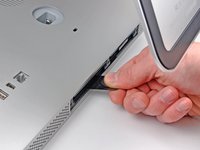
  • Use the sharp tip of a spudger to pull the black plastic RAM tabs out of the memory bay.

Image #1 Image #2

Add Note Edit Step 3  ¶ 

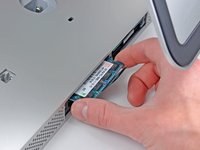
  • Pull the black plastic RAM tab away from your iMac to eject the RAM chip.

  • Grab the RAM chip by its edges and pull it straight out of its slot.

  • If two RAM chips are installed, repeat this process for the other chip.

Required Tools

Spudger

$2.95 · 50+ In stock

Phillips #1 Screwdriver

$4.95 · 5 In stock

Related Products

PC3-8500 2 GB RAM Chip

$49.95 · 11 In stock

PC3-8500 1 GB RAM Chip

$19.95 · 50+ In stock

Recommended Tools

Universal Drive Adaptor

$29.95 · 50+ In stock

iFixit Lock Pick Set

$29.95 · 21 In stock

Inspection Scope

$39.95 · 39 In stock

Frictionless Ratchet

$24.95 · 48 In stock

Portable Anti-Static Mat

$24.95 · 16 In stock

Comments Add Note Comments are offturn on