Introduction
Like brain surgery? Use this guide to replace your logic board.
What you need
-
-
Lay the iMac display-side down on a flat surface (putting a cloth under the screen to protect it from bumps).
-
Loosen the three Phillips screws securing the rear panel to the iMac.
-
-
-
Rotate each of the two RAM retaining arms away from the RAM chip.
-
Pull the RAM chip straight away from its socket.
-
-
-
Remove the two 7.3 mm Phillips screws securing the display data cable to the logic board.
-
-


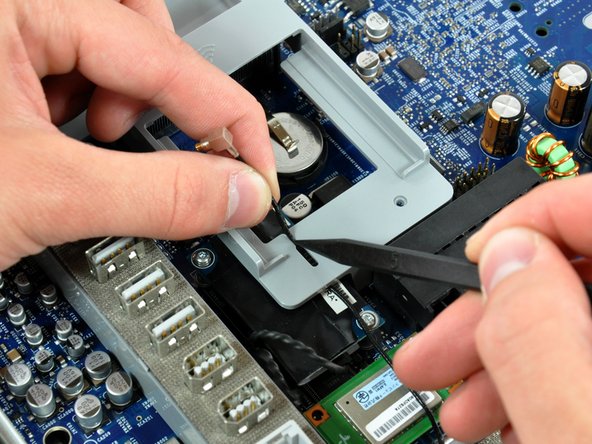


To reassemble your device, follow these instructions in reverse order.
To reassemble your device, follow these instructions in reverse order.
Cancel: I did not complete this guide.
57 other people completed this guide.


5 Comments
After removing and replacing the logic board on my iMac G5 twice, I thought I should add a suggestion.
Before replacing the board, it helps to tape or tie back all of the cables and connectors well out of the way. It's so easy to accidentally trap one of the connectors under the edge of the board. Also make sure to tie the speaker cables in a little bundle to make sure they fit into the small notch in the board/frame as it goes down.
One more item. When lowering the board into place, watch the small white plastic sleep light cone. The left of the two ears tend to get stuck on the edge of the (midplane?). It's difficult to see, but you can poke the end of a spurger in from the left to move the cone over just far enough to clear as the board is lowered. Make sure the holes in the sleep light cone ears are located over the little white matching pins. I made this mistake which caused me to remove the logic board, disturbing the thermal paste on the CPU.
My compliments to Andrew and everyone else who's been involved in this guide. I'd like to add my own suggestion regarding the 2
SATA cables and their routing. Make sure to A. Take a photo of any wiring routing prior to disassembly, and B. Note that the SATA power and data cables route UNDER the logic board as they pass from the HDD to their respective connectors on the logic board. I made the mistake of not paying attention and had to backtrack a bit to properly route those wires. Could / Would not have done this job without your guide so thank you very much!
Excellent guide, I recently found an old iMac A1076 for 20 bucks at a thrift store, it powered on but no display. I ordered a replacement logic board and this guide was really easy to follow to replace the faulty old board. It’s now up and running great! Thanks again
My problem is when the power cable on,the led 1,2 is on,hit the power button,the sound DON can hear,but led 3,4 is off,the fans is normal,but after half past minute,the fans begin loud noise screen still black,is the problem is logic board or the LCD display?much appreciate
You should post your question in the forum to get a faster response. It’s been awhile since I’ve worked on this machine and don’t quite remember the LED indications. Doesn’t sound like an LCD issue.
