Installing Power Mac G4 Cube Modem

User-Contributed Guide

User-Contributed Guide

An awesome member of our community made this guide. It is not managed by iFixit staff.

Installing a new Modem.

  • Author: Ryan Chun
  • Time required: 15 to 30 minutes
  • Difficulty: Moderate

Installing Modem involves removing the outer case and video card before installation.

Sections
Tools
Image #1 Image #2 Image #3

Add Note Edit Step 1 — Outer Case  ¶ 

  • Release the back handle of the PowerMac. Slowly pull out the cube by holding the end of the handle. Watch for any parts that may become entangled with the outer case.

  • Push back the handle after you have taken the core out of the case.

Image #1 Image #2

Add Note Edit Step 2  ¶ 

  • Place the cube upside down and remove the four screws on the front plate. Then remove the two screws on each side.

Image #1

Add Note Edit Step 3  ¶ 

  • Slowly lift the plate off the cube and disconnect the power cord.

Image #1

Add Note Edit Step 4  ¶ 

  • Remove the four pillars from each corner.

  • The pillars should come out fairly easily.

Image #1

Add Note Edit Step 5 — Video Card  ¶ 

  • Remove the screws on the back of the VGA port.

Image #1

Add Note Edit Step 6  ¶ 

  • Remove the screw attaching the video card to the logic board.

Image #1 Image #2

Add Note Edit Step 7  ¶ 

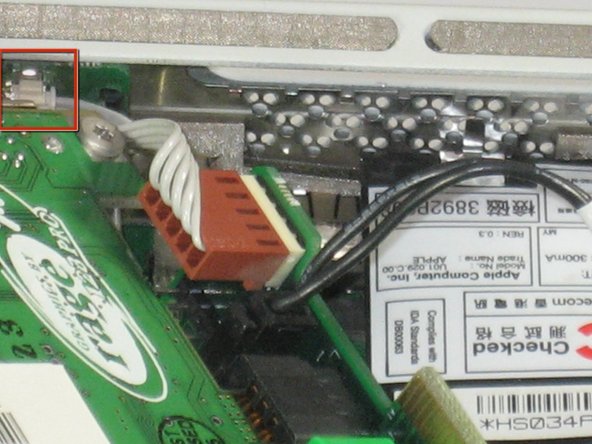
  • Remove power cord from the video card.

Image #1

Add Note Edit Step 8  ¶ 

  • Remove the power cord.

  • Remove the connector.

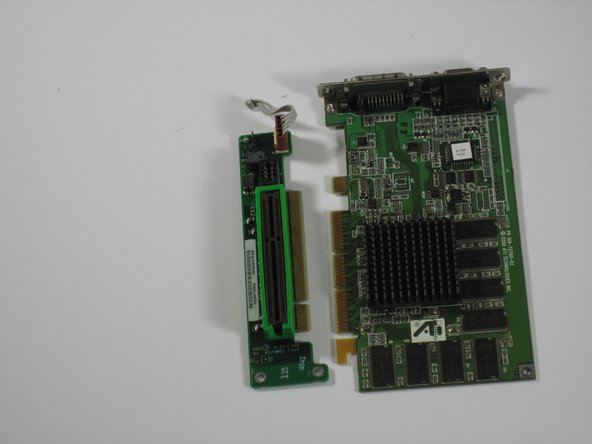
  • Remove the video card from the logic board.

Next » « Previous

Required Tools

T10 Torx Security Bit Screwdriver

$6.95 · 50+ In stock

Popular Products

1 TB SATA Desktop Hard Drive

$129.95 · 16 In stock

iPhone 4S Earpiece Speaker

$24.95 · 36 In stock

iPad 4th Gen Front Panel Assembly

$134.95 · 32 In stock

26 Bit Driver Kit

$19.95 · 43 In stock

Heat Gun

$24.95 · 23 In stock

Comments Add Note Comments are offturn on