Installing MacBook Pro 15" Unibody Late 2008 and Early 2009 Left Fan

  • Add Note x
  • x 20

Replacing a defective fan is pretty easy and will keep your laptop running cool.

Sections
Tools
first image
thumb image 1
thumb image 2

Add Note Edit Step 1 — Access Door  ¶ 

  • With the case closed, place the Unibody top-side down on a flat surface.

  • Depress the grooved side of the access door release latch enough to grab the free end. Lift the release latch until it is vertical.

first image

Add Note Edit Step 2  ¶ 

  • The access door should now be raised enough to lift it up and out of the Unibody.

first image

Add Note Edit Step 3 — Battery  ¶ 

  • Be sure the access door release latch is vertical before proceeding.

  • Grab the translucent plastic tab and pull the battery up and out of the Unibody.

  • If the latch is depressed it will lock the battery in place.

first image

Add Note Edit Step 4 — Lower Case  ¶ 

  • Remove the following eight screws securing the lower case to the chassis:

    • One 5.4 mm Phillips screw.

    • Three 14 mm Phillips screws.

    • Four 3.5 mm Phillips screws.

first image

Add Note Edit Step 5  ¶ 

  • Using both hands, lift and remove the lower case off the upper case.

first image
thumb image 1
thumb image 2
thumb image 3

Add Note Edit Step 6 — Left Fan  ¶ 

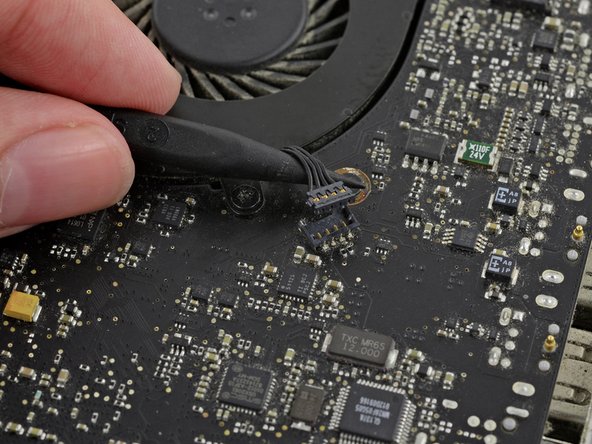
  • Use a spudger to pry the fan connector straight up off the logic board.

  • It is useful to twist the spudger axially from beneath the fan cable wires to release the connector.

  • The fan socket and the fan connector can be seen in the second and third pictures. Be careful not to break the plastic fan socket off the logic board as you use your spudger to lift the fan connector straight up and out of its socket. The layout of the logic board shown in the second picture may look slightly different than your machine but the fan socket is the same.

first image

Add Note Edit Step 7  ¶ 

  • Remove three 3.5 mm Phillips screws securing the left fan to the upper case and logic board.

first image

Add Note Edit Step 8  ¶ 

  • Lift the fan out of the upper case.

To reassemble your device, follow these instructions in reverse order.

For more information, check out the MacBook Pro 15" Unibody Late 2008 and Early 2009 device page.

Did you successfully follow this guide?

This guide has been completed 20 times.

Required Tools

Spudger

$2.95 · 50+ in stock

Phillips #00 Screwdriver

$4.95 · 50+ in stock

Related Products

Recommended Tools

Home Tech Toolkit

$24.95 · 22 in stock

Sorting Tray

$7.95 · 16 in stock

Anti-Static Wrist Strap

$7.95 · 50+ in stock

Pro Tech Base Toolkit

$59.95 · 50+ in stock

Thirsty Bag

$9.95 · 50+ in stock

Comments Add Note Comments are offturn on