Introduction
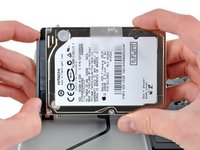
Use this guide to replace a dead hard drive.
What you need
Video Overview
-
-
Remove the following ten screws:
-
Three 14.4 mm Phillips #00 screws
-
Three 3.5 mm Phillips #00 screws
-
Four 3.5 mm shouldered Phillips #00 screws
-
-
-
Use the edge of a spudger to pry the battery connector upwards from its socket on the logic board.
-
-
-
-
Remove the two Phillips screws securing the hard drive bracket to the upper case.
-
-
-
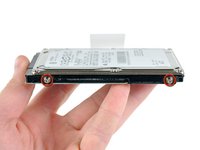
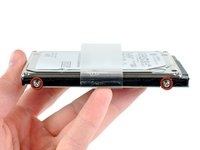
Remove the four 6.0 mm T6 Torx hard drive retaining posts from the sides of the hard drive.
-
Transfer the hard drive retaining posts to your new hard drive.
-




To reassemble your device, follow these instructions in reverse order.
Cancel: I did not complete this guide.
441 other people completed this guide.


33 Guide Comments
Under updated firmware, macbook pro unibody models will not recognize many third-party hard drives. See this discussion: https://discussions.apple.com/message/15...
Awesome guide! Swapped my 320GB hard drive for an 1TB hard drive. Took five mins thanks to iFixit!
hey, do you use SATA 3 for you’re MacBook Pro A1278? is it work good? no problems?
dimdimisra, you use the built in cable that comes in it, because of the proprietary mortherboard connector, you can’t use a regular SATA 3 cable
I feel you should be pointing out a couple of things about the chassis screws that are not obvious to the inexperienced
- the 6 screws that are not along the hinge edge of the body (4 yellow & 2 of the orange) are not perpendicular to the flat surface; they go in at an angle such that their heads are flat in the curve in which they sit. Attempting to hold the screwdriver upright in these heads could lead to damage to the screws, stripping out the "cross"
- attempting to insert these screws "straight" when reassembling will lead to cross-threading and stripping the screw threads
