Introduction
Changing the top case will also give you a new trackpad and keyboard.
Note: the ribbon cable is fragile but replaceable, it is connected with a ZIF socket under the touchpad.
What you need
-
-
Unscrew the three evenly-spaced Phillips 000 screws from along the rear wall of the battery compartment.
-
-
-
-
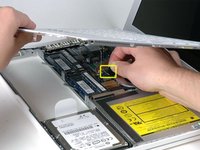
Remove the following 3 screws:
-
One 11 mm Phillips#00 in the middle of the lower case. (Head: 5mm dia. x .75mm thick)
-
Two 14.5 mm Phillips #00 (Head: 5mm dia. x .75mm thick)
-


To reassemble your device, follow these instructions in reverse order.
Cancel: I did not complete this guide.
409 other people completed this guide.


14 Guide Comments
Note that the actual keyboard is sandwiched between the top case and an aluminum backing panel that is plastic welded together. Because of this, the keyboard can not be replaced without modification to these plastic weld points.
I actually purchased a replacement keyboard only to find out that I should have purchased the whole top case unit.
Many thanks for this guide. I was able to replace my old fried keyboard with no problem!
Wow. I have used this guide religiously 3 times now and I can not thank enough for it to the provider. You won't find anything more informative, explicit, graphic, descriptive but simple and basic oriented out there, and without leaving key details out. I think you did a FANTASTIC job with this guide, and thank you again. I'm very happy I found this link.
By the way, much better and appropiate than those dozens of youtube videos.
On step 10 the last screw, the one farthest away from the optical drive, would not come out. My screw driver is fine and the screw look ok but it will not come out. I'v been trying for 30 minutes now.
hello staff ifixit
I have a question happens when I change the upper case of this team and still does not work bring it to a central apple and tell me I have to change the logic board is this true and if so how is that is damaged
