Introduction
There are many benefits to adding a second hard drive to your laptop such as improved speeds, greater storage space, and less heartache when installing new software. Use this guide to install one using our optical bay hard drive enclosure.
What you need
-
-
Unscrew the three evenly-spaced Phillips screws from along the rear wall of the battery compartment.
-
-
-
Remove the following 3 screws:
-
One 11 mm Phillips#00 in the middle of the lower case. (Head: 5mm dia. x .75mm thick)
-
Two 14.5 mm Phillips #00 (Head: 5mm dia. x .75mm thick)
-
-
-
-
Grasp the white plastic tab attached to the hard drive and pull it to the left, removing the hard drive from the computer.
-
-
-
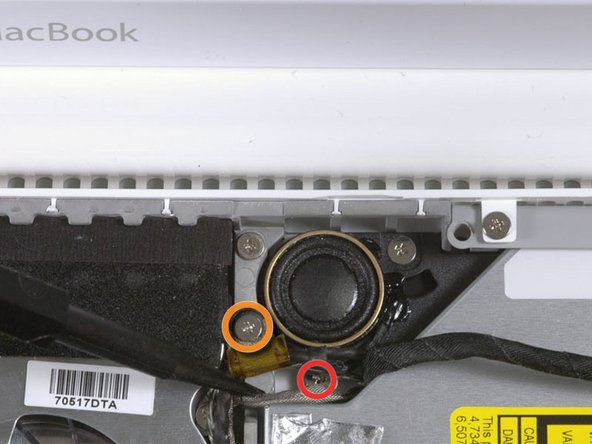
Remove the 2 mm Phillips #00 screw securing the rear corner of the optical drive.
-
The silver-jacketed Bluetooth cable may be covering the screw. If so, carefully push it aside. You may need to remove the screw holding the ground shield lugs for the two nearby cables before you can move the Bluetooth cable aside sufficiently. This screw is 7mm in earlier models, and may be 4.2mm in Santa Rosa/Penryn and 2009 models.
-
-
-
Lift the side of the optical drive closest to you, then slide the drive towards you, and up and out of the computer.
-
First, slide its side nearest to the rear of the Macbook under the edge of the rear frame to the left of the hinge, while also sliding the optical drive's mounting tab at its upper left corner under the cables at this location.
-
Lower the drive partially into the lower housing. Keep the hard drive cable away from the optical drive bay.
-
Before dropping the drive fully in place, use a spudger to push forward (towards the front of the drive) on the screw hole in the drive's mounting tab.
-
Push forward the slider, which runs along the far side of the drive, to insert the end of this slider into a small channel in the lower case's frame. This helps hold the drive in place.
-
-
-
Peel up the black tape partially covering the orange optical drive cable.
-
-
-
Use a spudger to carefully pry the silver metal bracket off the left side of the optical drive. Be careful not to bend the bracket, as it is very thin and bends easily. If the bracket doesn't come free easily, heating the adhesive may make prying the bracket off easier.
-
-
-
Remove the plastic positioner from the optical bay hard drive enclosure by pressing in on one of the clips on either side and lifting it up and out of the enclosure.
-
-
-
Make sure that the hard drive connectors are facing down before placing it into the enclosure.
-
Gently place the hard drive into the enclosure's hard drive slot.
-
While firmly holding the enclosure in place with one hand, use your other hand to press the hard drive into the enclosure connectors.
-




To reassemble your device, follow these instructions in reverse order.
To reassemble your device, follow these instructions in reverse order.
Cancel: I did not complete this guide.
69 other people completed this guide.


7 Comments
I just successful follow this guide to add 2nd hard drive to my old Macbook White 4.1. It really helpful, just a part take me some time. It is bluetooth atena board part, it cause my keyboard got big gap. Finally I hide it below my Optibay, so far the bluetooth still working well. Thanks iFix. :D
only took about 10-15 minutes for me when i was practicing on my broken Macbook white(as not to risk my new one), this guide is the best one i've seen yet, it is a little bit harder than moderate when you don't have a small phillips screwdriver though, but my steak knife worked pretty well too, thanks guys
Thanks, I used this guide to reuse the hard drive as an external.
J'installe ssd PNY dans la boîtier, mais mbp ne reconnaît pas ce ssd. Merci pour m'aider à fixit.
