Installing iPod Touch 4th Generation Headphone Jack

Replace a broken headphone jack on your 4th generation iPod Touch.

  • Add Note x
  • x 36

Use this guide to replace the headphone jack on your iPod Touch.

Image #1

Add Note Edit Step 1 — Front Panel  ¶ 

  • The iPod Touch 4th Generation front panel is attached to the rear case by adhesive. The use of a heat gun to soften the adhesive is highly recommended.

  • With the heat gun set on "low", begin heating the lower portion of the Touch near the home button.

  • It is suggested to heat the desired portion in a circular motion pattern to evenly dissipate the amount of heat throughout the device.

Image #1 Image #2

Add Note Edit Step 2  ¶ 

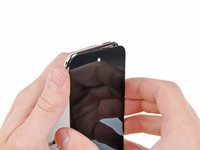
  • Beware, as the Touch will be very hot. It may be helpful to hold it with a towel while prying.

  • Insert the edge of an iPod opening tool between the front glass panel and the black plastic bezel near the home button.

  • Do not try to pry between the black plastic bezel and the steel rear case.

  • Pry the bottom edge of the front panel upward, being careful not to bend the glass excessively.

  • If it is too difficult to pry up the front panel assembly, reheat it and try again.

Image #1

Add Note Edit Step 3  ¶ 

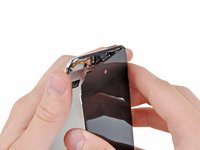
  • When there is enough room to grab the bottom edge of the front panel, lift it away from the body of the Touch to peel up the adhesive along its left and right edges.

  • If the adhesive is too difficult to separate, use a heat gun to soften it before proceeding.

Image #1 Image #2

Add Note Edit Step 4  ¶ 

  • Due to the construction of the 4th generation Touch, the digitizer cable cannot be disconnected until the logic board is removed. Use extreme caution when handling the front panel assembly, as it is attached to the rest of the Touch by the very delicate digitizer cable.

  • Also, the display data cable is very short and is connected to the logic board near the top of the front panel assembly. If it does not become disconnected while freeing the top edge of the front panel assembly, be sure to disconnect it with an iPod opening tool before rotating the front panel assembly out of the Touch.

  • Carefully pull the top of the front panel assembly away from the adhesive holding it to the Touch, minding the short digitizer cable connecting the two components.

Image #1

Add Note Edit Step 5  ¶ 

  • Remove the following eight Phillips #00 screws:

    • One 3.5 mm Phillips screw

    • Two 3.0 mm Phillips screws

    • One 2.3 mm Phillips screw

    • One 2.4 mm Phillips screw

    • Three 2.0 mm Phillips screws

Image #1

Add Note Edit Step 6  ¶ 

  • Use the edge of an iPod opening tool to pry the thin steel cover up from the rear-facing camera.

  • Note the small spring located near the bezel next to the camera (highlighted in yellow).

  • Remove the steel cover from the iPod.

Image #1 Image #2

Add Note Edit Step 7  ¶ 

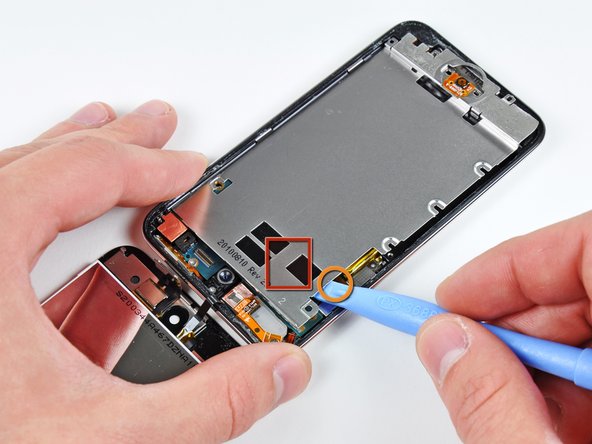
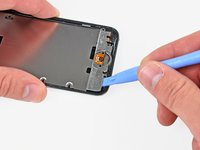
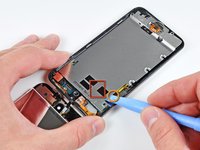
  • Insert the edge of an iPod opening tool under the steel mid plane near the bottom left corner of the Touch.

  • Pry upward to separate the plate from the adhesive securing it to the plastic inner case.

  • If the plate is still attached to the logic board re-warm the area to loosen the adhesive, then separate the plate from the logic board using the opening tool

  • Use extreme care, the speaker is under the area shown in photo. It is connected with very thin and short wires.

  • There is a very thin ribbon cable here that connects the volume and power buttons to the logic board. Try to work around this area like shown so not to rip the cable. It is extremely fragile.

    • This cable will tear very easily if you are not careful.

    • There is also adhesive under the area shown in red.

Image #1 Image #2

Add Note Edit Step 8  ¶ 

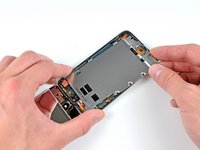
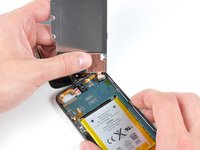
  • Slightly tilt the steel mid plane to dislodge it from the rear case.

  • Be careful not to tear the piece of copper tape connecting the rear-facing camera to the steel mid plane.

  • Lift the steel mid plane up off the rear case and peel off the piece of copper tape stuck to the rear-facing camera.

Image #1

Add Note Edit Step 9 — Headphone Jack  ¶ 

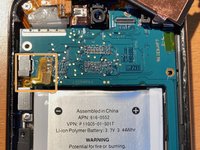
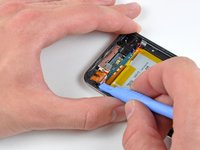
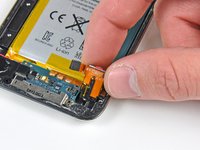
  • Use an iPod opening tool to pry the headphone jack connector up and out of its socket on the logic board.

Image #1

Add Note Edit Step 10  ¶ 

  • Remove the single 2.6 mm Phillips screw securing the headphone jack assembly to the rear case.

  • The screw is at a 90 degree angle. Make sure to remove it at such an angle.

Image #1 Image #2

Add Note Edit Step 11  ¶ 

  • Use an iPod opening tool to gently lift the edge of the headphone jack nearest the battery out of its recess.

  • Remove the headphone jack from its housing within the rear case.

Required Tools

Phillips #00 Screwdriver

$4.95 · 50+ In stock

Plastic Opening Tools

$2.95 · 50+ In stock

Heat Gun

$24.95 · 22 In stock

Related Products

iPod Touch Gen 4 Headphone Jack

$24.95 · 11 In stock

Recommended Tools

Universal Drive Adapter

$29.95 · 50+ In stock

Inspection Scope

$39.95 · 17 In stock

Portable Anti-Static Mat

$24.95 · 10 In stock

Comments Add Note Comments are offturn on