Installing iPhone 4 Contact Clip

This is the clip that goes right next to the battery connector. It is sometimes called the pressure contact as well.

  • Author: Scott Head
  • Time required: 5 Minutes
  • Difficulty: Easy
  • Add Note x
  • x 27
Sections
Files
Tools
Tools (continued)
Relevant Parts
Image #1 Image #2

Add Note Edit Step 1 — Rear Panel  ¶ 

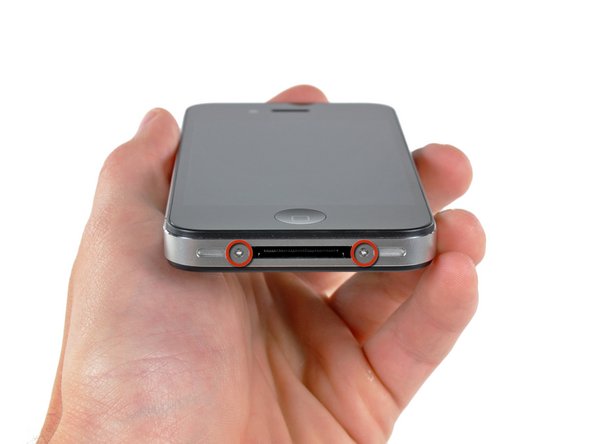
  • Your iPhone 4 rear cover may have either two #000 Phillips screws or Apple's 5-Point "Pentalobe" screws (second image). Check which screws you have, and ensure you also have the correct screwdriver in order to remove them.

  • Remove the two 3.6 mm Pentalobe or Phillips #000 screws next to the dock connector.

  • During reassembly, we recommend you replace the 5-point screws with equivalent Phillips screws. Our Liberation Kit provides the tools and screws needed to replace the Pentalobe screws with Phillips screws.

Image #1 Image #2

Add Note Edit Step 2  ¶ 

  • Push the rear panel toward the top edge of the iPhone.

  • The panel will move about 2 mm.

Image #1

Add Note Edit Step 3  ¶ 

  • Pinch the rear panel with your fingers and lift it away from the iPhone.

Image #1

Add Note Edit Step 4 — Contact Clip  ¶ 

  • Remove the single 2.5 mm Phillips screw securing the battery connector to the logic board.

Image #1 Image #2 Image #3

Add Note Edit Step 5  ¶ 

  • Use an iPod opening tool to carefully pry the battery connector up from the ends closest to the top and bottom edges of the iPhone.

  • Do not pry against the contact clip.

  • Remove the contact clip from the iPhone.

  • Before reconnecting the battery connector, be sure the pressure contact (shown in red) is properly positioned next to the battery connector.

    • Before reassembly, be sure to clean all metal-to-metal contact points on the pressure contact as well as its contact point on the rear panel with a de-greaser such as windex. The oils on your fingers have the potential to cause wireless interference issues.

Required Tools

Phillips #00 Screwdriver

$4.95 · 50+ In stock

Plastic Opening Tools

$2.95 · 50+ In stock

Phillips #000 Screwdriver

$9.95 · 50+ In stock

iPhone 5-Point Pentalobe Screwdriver

$12.95 · 50+ In stock

Related Products

iPhone 4 Contact Clip (GSM/AT&T)

$5.95 · 38 In stock

Recommended Tools

Universal Drive Adaptor

$29.95 · 50+ In stock

iFixit Lock Pick Set

$29.95 · 16 In stock

Inspection Scope

$39.95 · 38 In stock

Frictionless Ratchet

$24.95 · 48 In stock

Portable Anti-Static Mat

$24.95 · 16 In stock

Comments Add Note Comments are offturn on