Introduction
Connects the iPhone to a computer or charger via iPhone cable.
What you need
Video Overview
-
-
If your display glass is cracked, keep further breakage contained and prevent bodily harm during your repair by taping the glass.
-
Lay overlapping strips of clear packing tape over the iPhone's display until the whole face is covered.
-
-
-
Remove the two Phillips #00 screws from the dock-connector end of the iPhone.
-
-


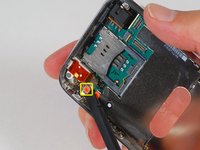
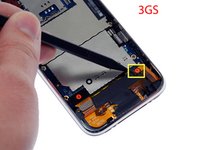


To reassemble your device, follow these instructions in reverse order.
Cancel: I did not complete this guide.
172 other people completed this guide.


1 Guide Comment
Hm, swapped the docking assembly, but now my phone will only show the apple logo for a few seconds, then goes black. Switched back to my original dock connector, but I have the same problem. Tried the power+home trick, but no dice. Don't think the battery is short cirquited, but not sure, tried to measure it, only got about 3.6 volt, but unsure where which og the pins to measure on.
I was able to boot the phone before swapping out the dock (wanted to swap it because I had no sound from the speaker plus no wifi antenna due to a ripped cord) but not after swapping back. I've gone over all connections and I am fairly sure everyting is hooked up as it should.
Stuck.
