Introduction
There are many benefits to adding a second hard drive to your laptop such as improved speeds, greater storage space, and less heartache when installing new software. Use this guide to install one using our optical bay hard drive enclosure.
What you need
-
-
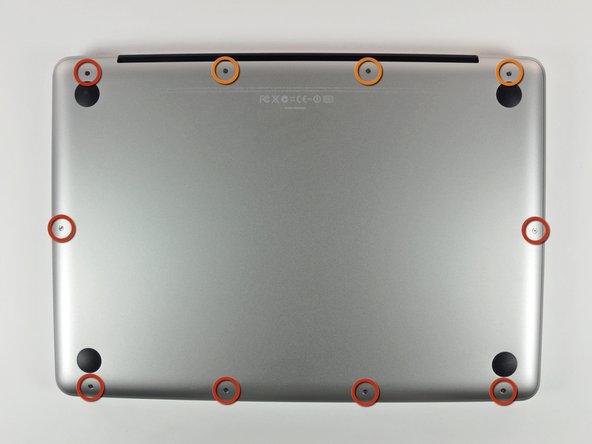
Remove the following 10 screws securing the lower case to the MacBook Pro 13" Unibody:
-
Seven 3 mm Phillips screws.
-
Three 13.5 mm Phillips screws.
-
-
-
Slightly lift the lower case and push it toward the rear of the computer to free the mounting tabs.
-
-
-
Use the flat end of a spudger to lift the battery connector up out of its socket on the logic board.
-
-
-
Remove the soft padding that may be on top and gently pull the connector up out of its socket on the logic board.
-
-
-
-
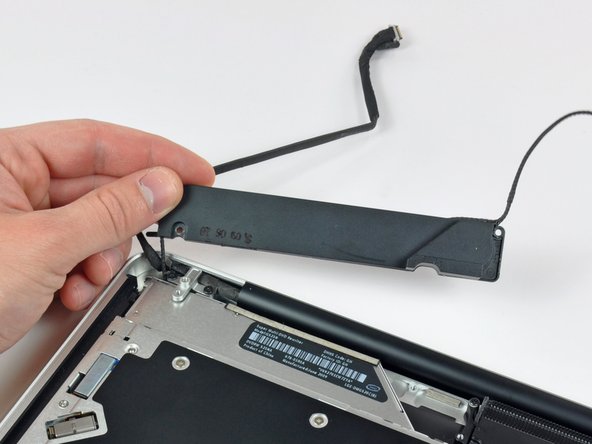
Remove the optical drive cable by pulling it straight away from the optical drive.
-
-
-
Remove the two black Phillips #0 screws securing the small metal mounting bracket. Transfer this bracket to your new optical drive or hard drive enclosure.
-
-
-
Remove the plastic spacer from the optical bay hard drive enclosure by pressing in on one of the clips on either side and lifting it up and out of the enclosure.
-
-
-
Make sure that the hard drive connectors are facing down before placing it into the enclosure.
-
Gently place the hard drive into the enclosure's hard drive slot.
-
While firmly holding the enclosure in place with one hand, use your other hand to press the hard drive into the enclosure connectors.
-




To reassemble your device, follow these instructions in reverse order.
To reassemble your device, follow these instructions in reverse order.
Cancel: I did not complete this guide.
106 other people completed this guide.


4 Comments
I bought a 1TB SSD/hybrid drive from Ifixit.com to upgrade the 256GB HDD that came with MBP 2010. Disk Utility could not see the new drive on the original HDD cable but saw the old one just fine. New replacement cable was not the correct size for the MBP 2010 but worked just fine in my other MBP 2012. Put the stock HDD back in with the original HDD cable, removed the optical drive and replaced with the 1TB dual drive per instructions without problems. I have read online that the SATA HDD cable in MBP 2009 and early 2010 was too slow to read modern high-speed SATA drives.
Only glitch I found is DVD/CDs will not mount in the optical drive using the external USB cable that came with the dual disk kit purchased here. Will eventually have to find time to try swapping the optical drive with my other laptop to test internally as well as the external cable. At this point I don't care, didn't use the optical, love the two working internal disk drives. Thanks guys!
I replaced Primary HDD with SSD and moved HDD to optical slot with caddy, and it seems works, but HDD in optical slot is incredibly slow now. Macbook 7.1. Sierra. SSD Savage 250Gb.
Smoooooth, like butta. Thanks for another great guide and parts. My 2010 macbook pro now has an ssd running fast w sierra, and my conventional drive for lots of storage. About $200 for ssd and the parts, and my computer will be in good shape for a few more years!
