Introduction
Removing the RAM is an easy task that requires no tools.
What you need
-
-
Place your thumbs in the depressions cut into the bottom cover.
-
Rotate the bottom cover counter-clockwise until the white dot painted on the bottom cover is aligned with the ring inscribed on the outer case.
-
-
-
-
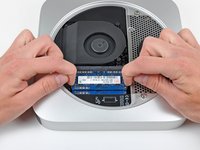
Release the tabs on each side of the RAM chip by simultaneously pushing each tab away from the chip.
-
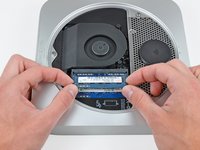
After the RAM chip has popped up, pull it straight out of its socket.
-


To reassemble your device, follow these instructions in reverse order.
Cancel: I did not complete this guide.
112 other people completed this guide.


13 Guide Comments
Here is an important trick: Apply no downward pressure while turning the cover. Pressing down will make it harder to turn.
I found this out when searching the web for why I couldn't open the bottom cover.
I have just fitted the two 8 GB rams but despite refitting several times my computer is only reading one card. It simply says 8 GB memory and one space available. The cards slotted tightly and clicked in position. I have tried exerting a little pressure on the cards to see if there was not good contact but they appear connected. Any ideas please?
I had difficulty, only one card is read, the computer says i slot available. Have fitted several times and exerted pressure to ensure contact but still only one card read. Any ideas please?
You should try to find out if the DIMM or the slot is broken: I suppose you tried to switch the DIMMs? The easiest way is to try only one DIMM (memory module), first in the lower slot, then in the upper slot.
IMPORTANT: reset the PRAM after altering the configuration, i.e. after moving a DIMM to another slot. (Hold Cmd+Opt+P+R when turning on the Mac and keep holding the keys until you've heared the start chime two times.)
https://support.apple.com/en-us/HT204063
If the one DIMM works in both slots, the slots are okay. Now try the other DIMM. If the second DIMM also works in both slots, I frankly have no other idea than to try a different version of OS X to rule out the possibility of a software problem.
muttztfz -
Removing the cover from the case: come on, people! Use force, but use it gently! There is no way to break things if you turn it into the direction of the second dot (to the left, counterclockwise). If you have to use force, don't push down towards the case, but use this force towards the intended cover rotation – you obviously have to push down also for the grip, but other than that: turn, baby, turn!
