Introduction
RAM, or random access memory, is short-term storage for your Compaq Mini 110. RAM is used by your processor for immediate use as-needed, unlike long-term files written to a hard disk drive. If your computer has slowed considerably or you’re looking for a boost, replacing/upgrading the RAM is a fairly simple and inexpensive first step. The Compaq Mini 110 laptop comes standard with 1GB of RAM and cannot be upgraded past a maximum of 1GB with its one (DDR2) slots.
What you need
-
-
Locate the battery and the battery tabs on the bottom of the Compaq Mini.
 Ask FixBot
-
-
-
-
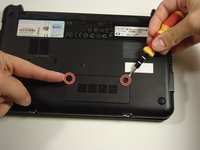
Use a Philips #0 screwdriver to unscrew the two screws covering the memory compartment on the bottom of the laptop and remove the cover.
-




To reassemble your device, follow these instructions in reverse order.
Cancel: I did not complete this guide.
3 other people completed this guide.

Team

Cal Poly, Team 22-2, Maness Fall 2010 Member of Cal Poly, Team 22-2, Maness Fall 2010
CPSU-MANESS-F10S22G2
6 Members
20 Guides authored
