AirPort/Bluetooth Board
|
14 Answers 10 Score |
Can you install any A1286 logic board in 15" Unibody? |
|
11 Answers 7 Score |
Battery Can't be Detected and Trackpad settings missing |
|
2 Answers 2 Score |
There is faint vertical green line on the screen |
|
1 Answer 0 Score |
How can I reset my 2011 MacBook Pro |
These are some common tools used to work on this device. You might not need every tool for every procedure.
A1286 (EMC 2353-1 MacBookPro8,2) 2 GHz, A1286 (EMC 2353-1 MacBookPro8,2) 2.2 GHz, A1286 (EMC 2353-1 MacBookPro8,2) 2.3 GHz
You can cost-effectively upgrade a number of components in the MacBook Pro 15" Early 2011.
Track down a number of hardware problems using the MacBook Pro 15" Unibody Troubleshooting page
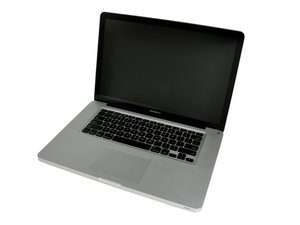
The MacBook Pro 15" Early 2011 Unibody was announced in February of 2011.
Use the [/info/ID-your-Mac|laptop identification system] to help you identify your machine. MacBooks tend to look very similar, and it's important to know which machine you have before ordering any replacement parts.
The MacBook Pro 15" Early 2011 Unibody's case is composed of a single block of aluminum, following the same process of the MacBook Unibody and the MacBook Pro 17" Unibody. The Unibody revision also introduced some features that were never before seen on an Apple laptop: the inclusion of dual video cards (one for regular use, one for graphics intensive applications), the Mini DisplayPort (which replaced the full-size DVI display connector), and larger hard drive and RAM capacities.
The MacBook Pro 15" Early 2011 is one of the first Apple laptops powered by an Intel quad-core i7. It features an AMD Radeon HD graphics processor. The newest addition to the family is Intel's new high-speed connector technology called Thunderbolt. Thunderbolt is supposed to transfer data at a rate of 10 gigabits per second. It can also be used to connect computers to external monitors and transfer data at the same time, all with a single cable.
Past 24 Hours: 12
Past 7 Days: 105
Past 30 Days: 438
All Time: 735,366