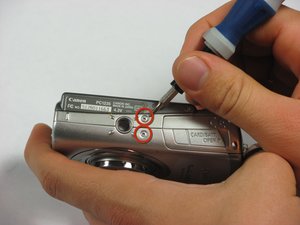
Battery


|
8 Answers 34 Score |
How do I fix my disconnected lens? |
|
1 Answer 1 Score |
Need 2.8 mm Phillips #00 screws |
|
1 Answer 0 Score |
Dropped camera now lens willnot close. |
These are some common tools used to work on this device. You might not need every tool for every procedure.
The Canon PowerShot SD850 IS Digital ELPH has a standard 8.0 Megapixel CCD high resolution lens with a 4x Optical Zoom with a Canon exclusive UA Lens and for stable zooming it has an Optical Image Stabilizer. Other amazing defaults this camera comes with includes a DIGIC III Image Processor with Face Detection and Red-eye correction. This camera also comes with an ISO 1600 setting for clearer images in low light, six Movie Modes and a 2.5-inch PureColor LCD with scratch-resistant, anti-reflective layer screen for easy viewing of pictures. The product was first seen and released in May of 2007.
Total Pixels: Approx. 8.3 Megapixels
Focal Length: 5.8-23.2mm f/2.8-5.5 (35mm film equivalent: 35-140mm)
Digital Zoom: 4x
Autofocus System: TTL Autofocus
LCD Monitor: 2.5-inch low-temperature polycrystalline silicon TFT color LCD
LCD Pixels: Approx. 230,000 pixels
Maximum Aperture: f/2.8 (W) - f/5.5 (T)
Shutter Speed: 15-1/1600 sec.
ISO Sensitivity: Auto, High ISO Auto, ISO 80/100/200/400/800/1600 (Standard Output Sensitivity. Recommended Exposure Index)
White Balance: Auto, Preset (Daylight, Cloudy, Tungsten, Fluorescent, Fluorescent H), Custom
Built-in Flash: Auto, Auto w/ Red-eye Reduction, Flash On, Flash On w/ Red-eye Reduction, Flash Off, FE lock, Slow Synchro
Shooting Modes: Auto, Auto w/ Red-eye Reduction, Flash On, Flash On w/ Red-eye Reduction, Flash Off
Storage Media: SD Memory Card, SDHC Memory Card, MultiMediaCard
Dimensions: 3.56 x 2.22 x 1.04 in./90.4 x 56.5 x 26.4mm (W x H x D)
Weight: Approx. 5.82 oz./165g (camera body only)
For more information regarding common problems and troubleshooting, check out Canon PowerShot SD850 IS Troubleshooting.
Past 24 Hours: 2
Past 7 Days: 7
Past 30 Days: 17
All Time: 23,728