
0
Score
Asked
Early 2006 model won't run but has power
Hi all, have looked through and can't find my exact fault appearing.
Unit is. 2006 model 1,1 only ever upgraded the ram to 5gb from original 1gb(2*512mb) ran fine for years like this with new ram in. Recently it was taking ages to restart unit. Press power button and white light would come on for few seconds then flash continually no display, no start up chime no extra fan noise.
Tried replacing with new ram this did nothing. Ran with casing off and checked diognosis LEDs when pressed the diognosis button lights up the trickle and the powr light only. Any thoughts on where to go next as don't want to end up buying all new internals if not needed
1
Score
machead3
21.3k
Answered
Reset the SMC. Leave unplugged for overnight reset the SMC, try to boot. This could be a bad HD, the PSU, Graphics Card or a logic board issue. Boot to Hardware Test to begin eliminating some variables report what it says.
If this Answer is helpful please remember to return and mark it Accepted.
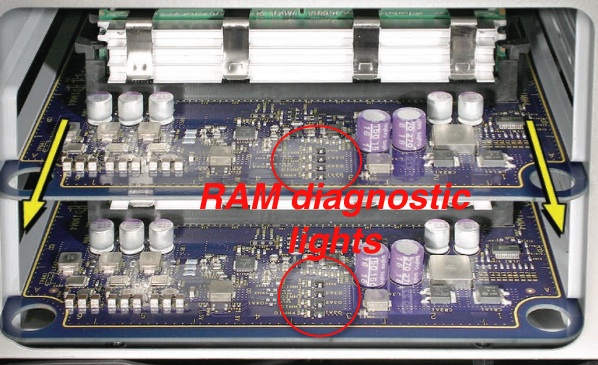
There are ''diagnostic lights on the RAM riser cards'' (where the RAM plugs in). Each RAM stick has a little LED. If the LED remains red after booting, then there may be a problem with that RAM stick or with the RAM slot.
I think if you are not getting any beep codes/flashing lights the logic board or EFI is bad. When you attempted to restart after pulling the RAM, or Video Card you should have received some failed POST (Power On Self Test) errors. That you didn't points to EFI (holds POST info) chip or logic board.
Morning machead3 yes the lights on the RAM riser board do go out and sadly there is no display at all. I have uploaded a short video if it would help to diagnose. http://www.youtube.com/watch?v=XV22SnO3d...
You have RAM problems: If the computer detects no RAM (Random Access Memory) or the RAM installed does not meet the appropriate specifications, the screen will remain black but the power LED on the front of the computer will blink once per second to signal the error. This error condition may be due to physically damaged RAM, installing the incorrect type of RAM, or not having RAM installed. see: this Apple Support Article
Check that you have properly seated the RAM and the RAM cards (those cards need a good push to seat completely).
1
Score
nick
15.3k
Answered
OK, you tried memory, change where the sticks are, could be bad slot(s) in this mac
From there, it may need a OS reload or a HDD if memory was no help
First reload the OS and try that, and if it is still slow, time for a new harddrive(back EVERYTHING up before you reload the OS in case before and after
Your issue is going to be much further in if these don't help you, and will require more exact details of what you see
Morning nick thanks for replying sadly I am unable to boot at all let alone reload the OS. Sadly I think machead3 might have given me the bad news I was expecting, but I have uploaded a video which might help diagnose the problem further.... See above link.
Reset the SMC. Leave unplugged for overnight reset the SMC, try to boot. This could be a bad HD, the PSU, Graphics Card or a logic board issue. Boot to Hardware Test and check what it says.
machead3,
Hi machead3 thanks so much for taking the time to respond to me. I have tried to reset to SMC by leaving unplugged overnight then pressing the SMC button (both unplugged and plugged) this did nothing at all. I've tried to boot to hardware test via holding down D and by manually ejecting disk drive and putting original software disks in. Nothing has worked. One thing I have noted is that when SMC BUTTON is pressed then released the CPUA & CPUB OVERTEMP LIGHTS flash once red then turn off. --- not sure that is relevant just want give as much info as possible. I have now removed cd tray and cd, graphics card, HDD's, and both RAM risers and the internal clock battery, but am at a loss to know what the problem is, any and all advise greatly appreciated :)
Shirefolk,