2

Score

Avatar
Tsutomu Niimi
405

Asked

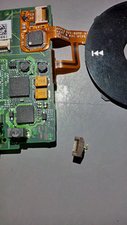
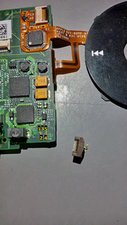
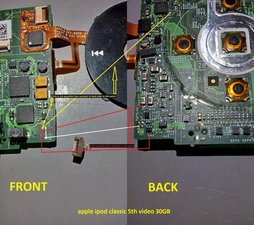
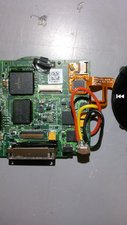
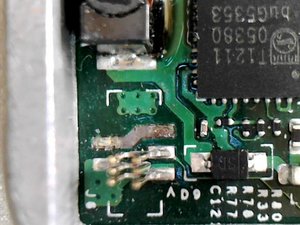
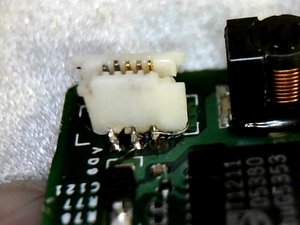
The Brown connector broken.

History

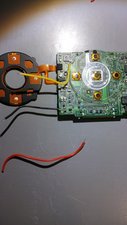
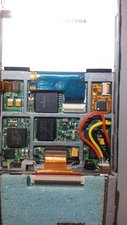
The brown connector break one of the arms. I still have it, what should i to do fix battery cable?

Update

Dear Mr.Oldturkey03.

I have to say a lot of thanks for your advice,

and knowledge. "arigatougozaimasu" in Japanese..

I try to daiagnostic my iPod, then I look up a funny incident.

My iPod has only 30GB, But diag says 289GB!

I will tray to change HDD, and restore.

I am very exicite that your kindly answers.

I like MAC and iPod.

Please help me !

Edited by: mayer, rj713, and Mike ( ) , Tsutomu Niimi ( ) , oldturkey03 ( )

Thank you Mr.Oldturkey03. Broken part is only plastic brown connector arm. Logic board is not broken.

Tsutomu Niimi,

I understand but the connector is what connects the battery cable to the logic board. What ipod is it?

oldturkey03,

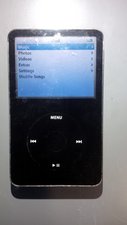
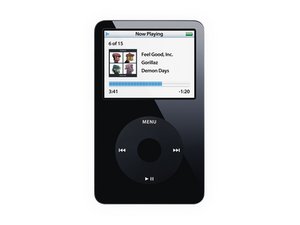
Dear.Mr.Oldturky03. My IPod is iPod video(5th) 30GB.

Tsutomu Niimi,

Thank you Mr. Oldturkey03. The picture is same as my iPod. And white parts has not damaged. Only brown part is broken. I pulled battery cable and brown part was also removed. It has 2 arms to fix the white part, and one arm is failed. I try to new battery and to reinstall. I am very happy your kindally answer, and thank you itFix it! As far as I am in Japan, but I am very happy to use Apple's iPod!

Tsutomu Niimi,

If it breaks put the cable in the slot and then push the brown holder in place to keep the cable from slipping out. Is it the best way to solve this incident??

Tsutomu Niimi,

Show 10 more comments

Post Answer

6

Score

Avatar
oldturkey03
91.2k

Answered

Accepted Answer

PermalinkHistory

Tsutomu Niimi, if the connector broke of the logic board, there are only two solutions. One is to get another connector from an old logic board and have somebody knowledgeable with SMD components solder it on. The only other way is to replace the logic board. UPDATE

If the brown part is off the white part, you can try and replace the clip with an old one from a spare board. If the white one is off the board with the pins sticking out, you can try and slide the white plastic back over it and use some glue to glue the plastic onto the board. If the pins are bend or dislodged you will have to get a new one soldered onto the board.

Edited by: iRobot ( ) , oldturkey03 ( )

Thank you, Mr.oldturkey03. I tryed to push brown connector, and it seemed to be sucessful. Battery cable was fixed comletely!!!!! I started up the iPod and the apple logo appeared!! Shortly after, a screen saying "Connect to your Computer. Use iTunes to Restore." in about 5 different languages. I connected it to my computer, then a message in iTunes showed up saying "iTunes has detected an iPod in recovery mode. You must restore this iPod before it can be used with iTunes." I then clicked Restore and entered in my Administrator name and password. Shortly after that, an alert popped up saying "The iPod "iPod" could not be restored. An unknown error occurred (1416)." What happend?????

Tsutomu Niimi,

It is possible that you are having further logic board issues and/or hard drive issues. What happened to the iPod before you changed the battery? I think the 1416 error is an initialize error. I would try to either put the ipod in diagnostic mode and see what it tells you, or run it in disk mode and see if you can access the HDD and definitely try to save all your files. Hold down the menu and the center button until the apple sign appears, then as soon as quickly as you can hold the center button and the play button down. When the disk symbol shows up in the middle of the ipod, hook it up to your computer. you are now in disk mode and see if you can access the drive. Try to reformat but remember that you will lose your files. Good Luck

oldturkey03,

0

Score

Avatar
Raiz
31

Answered

PermalinkHistory

If the brown hold down is broke, I cut a small piece of notebook paper that would fit into the connector and slide the ribbon on top of it, make sure the ribbon is all the way in.

0

Score

Avatar
Will Wallace
1

Answered

PermalinkHistory

Hey I don't know if you still need an answer but i've managed to fix my Ipod Video with the same problem. I did it the cheap way and with Super Glue!

Basically I broke the retention clip off the LCD connector which is on the logic board.

I found that I needed the LCD display to be on in order for Itunes to successfully detect my IPOD, and use it (obviously).

Because the retention clip is missing, it means you can push the ribbon cable all the way "through" the connector and it won't get contact with the pins on the logic board, this is why with mine when you push the ribbon half way into the connector it'll light up, but then when you push it all the way through it goes black again.

What I did was, and it's incredibly easy, is push the ribbon cable into the connector with the missing retention clip, hold it in place so the screen lights up, and applied superglue to the connector and edges of the cable, and it worked fine. I did this while my ipod was on and connected to a computer. I didn't really care if I stuffed my ipod completely though.

Can post photos showing it going/ with the cover off and missing retention clip if needed.
Will, I've had the same retention clip problem with the hard drive . I would love to view a picture of the solution you used.

rick pringle,

Hey Rick, My Ipod died yesterday, I re-opened it and found the Super Glue I had used pretty much melted part of the ribbon cable and stripped away some of the small semi-conductor type things on the Ipod. In Hindsight what I would have done, and to be honest have no idea why I didn't, is use a hot glue gun to keep the Ribbon cable on the Logic board and the pins aligned with the connector. You would probably have to do this while the ipod was on and showing the GUI screen (where you pick your songs etc..) as what you might find it you glue it in place, turn it on, and have the White screen of death

Will Wallace,

So it turned out to be not such a great repair, but a good temporary fix?

oldturkey03,

0

Score

Avatar
Tsutomu Niimi
405

Answered

PermalinkHistory

The conclusion of a solution for battery cable problems

1)Only the brown connecter was broken

You should order a new part this site, and reinstall it.

http://www.parts4ipods.com/epages/es1157...

Then it could be OK, and your iPod would be resumed.

2)Serious situation

When a white part have been removed from the logicboard.

(Very serious problem, no adhesive can help this problem.)

A situation is told to below by e-mail or Fax, and you send parts, and have you solder to a logicboard again.

E-mail:webmaster@noseseiki.com

Mr.Masaharu Nose(CEO)

Address

"Nose-seiki co.Ltd."

271, Ohhagi-Town Higashiohmi-City Shiga-Pref. Japan

Postal code 527-0174

Tel:81-749-29-0989

Fax:81-749-46-1133

Also I introduce this company homepage and weblog.

"Re-soldering of the connector which has taken the ipod board"

http://www.soldering-guide.com/archives/...

http://www.noseseiki.com/drhanda/patan.h...

Sorry, although it is a Japanese site, but I think that it turns out that I introduce if you have a photograph and movie seen.

I think that there is no company which has the technology so far in the world as far as I get to know.

Do not give up, Good luck and God bless you.

Hey, I found an Ennglish version. http://www.soldering.jp/ Do not give up and God bless you!

Tsutomu Niimi,

Add Your Answer