
1
Score
moochieboy
13
Asked
Does anyone know if two 15mm tall drives will fit into the Mac mini?
Discussion Topic
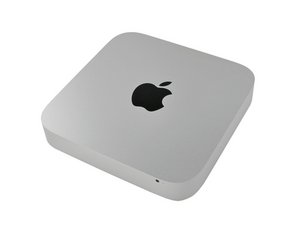
I have a Mid 2011 Mac Mini. I am anxiously awaiting to buy the "Mac Mini Dual Hard Drive Kit" Mac Mini Dual Drive Kit
I'd like to put two enterprise class 2.5" 1TB SATA drives. The specs on the drive is as follows:
Seagate Constellation.2 ST91000640NS 1TB 7200 RPM 64MB Cache 2.5": 15mm z-height
If not, can someone suggest another 7200RPM 2.5" SATA drive w/ 1TB of capacity? I am not seeing any. Thanks!
Edited by: Sterling Hirsh ( )
3
Score
ABCellars
13.7k
Answered
The answer is no. Please see step 7 here. There is only 15mm of "extra space" underneath the factory original 9.5mm drive. Actually for a number of reasons should not attempt to put 1 in there with a standard 9.5mm drive. Read the reviews here on the Seagate Constellation.2 ST91000640NS hard drive. It is a power hog the Mini's power supply more than likely couldn't power it up and if it did you would suffer other consequences in the USB realm and others. It runs very hot, not a good thing in the mini. If you got to have internal Terra drives go with the newer WD Scorpio Blue Or the Samsung for inside the Mini.
Personally with a Mini. I would go with a SSD for my operating system, virtual memory and programs.Then a larger slower hard drive for data. It is actually the hard drive that the virtual memory is placed on that makes the biggest difference in a computers performance. After that, it is the hard drive the operating system is on that determines how snappy a computer performs. Your data hard drive doesn't need to be fast. It needs to be reliable.
1
Score
Brian
2.4k
Answered
As far as i know two drives 9.5 mm is your current option, and a "fast" 1TB drive in that size isn't around yet as far as i know.
Western Digital makes a 1TB blue line that should work fine.
You would have to go a bit smaller 500-750GB WD's black line for a proper fit and a higher performance drive, Black line also has advanced format models, 4k sectors, allowing for more useable space after formatting then a regular drive........an
Hatachi makes some nice drives too........ i am most familiar with WD's line as i have been using them for years.
hope this helps.
1
Score
MarkBubba
13
Answered
0
Score
mark munro
115
Answered
I have successfully installed the 12.5 mm WD Scorpio Blue (1TB) in the upper bay. I do not have a heat issue, especially after replacing the heat sink interface with Arctic Silver 5 Thermal paste. Its snug, but it slipped in easily. I agree with ABCellars with regards to the SSD as the boot drive. The WD is only 5200 rpms but it is plenty fast for a storage drive. Power consumption is well within the capabilities of the power supply, so I wouldn't worry about that.
0
Score
mdgrmg
1
Answered
This question was migrated from http://meta.ifixit.com/Answers.
iRobot,

