1

Score

Avatar
Shai
155

Asked

Home button sometimes not working

History

Hi, If you need to press very hard on the home button, what is that means?

Need a new button? Or it is a flex ribbon? Or it is something that easy to fix and can be done just with making sure that all parts in place?

Thanks

Edited by

Do you still feel the "clicking" action when you press it?

Scott Head,

Yes, I feel clicks. Can you please tell me how you diagnose it?

Shai,

Post Answer

3

Score

Avatar
martin
1.2k

Answered

Accepted Answer

PermalinkHistory

Hi Shai

I have come across this exact issues a few times. The home button itself is just a piece of plastic that pushes the flex ribbon beneath it causing the circuit to short in turn making the home button work. I can pretty much guarantee you the flex ribbon is the cause of this issue (erosion/poor quality part/rust etc.) and can be fixed quite easily, however it does require a complete strip of the iphone and requires the screen to be taken off.

It is also fairly cheap as i do it in my store for $39, so i'm sure you will be able to find it somewhere for just as cheap. Also the other option listed below about using the 30 pin connector cable to try to lodge the button back into place is worth a shot!

Edited by

Martin is probably right about it being a bad home button. You can also buy the part and do it yourself. http://www.ifixit.com/iPhone-Parts/iPhon...

Scott Head,

Thanks Martin and Scott. Martin so you suggest to replace it all with the item Scoot added? Or I should only fix the Flex? Thanks!

Shai,

Well if you are confident with taking your iPhone apart then yes use the part Scott has lined you :)

martin,

hh.. never tried heating the glass.. well, thanks anyway :)

Shai,

9

Score

Avatar
Ezekiel
77

Answered

PermalinkHistory

Its a hardware issue that Apple overlooked. Try this work around to save money. Plug your iPhone USB cable into the phone (No need to plug the other end to anything) and grip the part right where it is plugged into the phone. Slightly bend it up towards the screen, just a little (You might even hear a click) and presto! This is guaranteed to work most of the time. If it doesn't, you need a new Home Button then.

Just dont blame anyone if you break something because this work around relies on your own strength..Ü

Hi My iPhone4 home button was unresponsive and after browsing for a solution I landed here, before plunging into disassembling the phone, buying parts, etc I tried the solution by Ezekiel and it worked! The button recovered it's characteristic "click" sound and is responsive as before. Thanks a lot! JP

Juan Ordonez,

I figured it could've been something like that. Can't believe it's so poorly made. Apple store wouldn't have replaced it for free since it was out of warranty and i was just about to buy all the tools and parts for the iphone 4. thanks for the awesome tip! I'm surprised Apple doesn't know this fix! Thanks! Jeff

Jeff Chen,

Hi there! I'm from Italy and I was getting crazy with this annoying problem. THANK YOU very much Ezekiel!!!!!! I've solved in it ONE second!!!!! Pls share this trick all over the world!!!! Again thank you!!! CIAO!! Edo

edo,

Hi, i iphone 4 home button failed to work.after browsing,i came a cross a Ezekiel's solution. i tried it and it worked! It is now working.thanks Ezekiel.

peter,

Amazing!! I was just about to tear into my beloved iphone 4 when I thought to take a look here. Man am I glad I did because the USB tweak fixed my unresponsive home button. It's workin like new again. Thank you so much! -rob

robm,

Show 6 more comments

2

Score

Avatar
Richard Peacock
25

Answered

PermalinkHistory

A solution for the brave

I have had this problem myself with a half responsive button, I have written the below article which has fixed my home button.

I had bought a replacement button but was daunted by the job at hand in taking the phone apart. Have a read and post your comments to let others know if it helped you too. Richard applecor:apple:

http://applecor.info/how-to/a-z/85-iphon...

Edited by

1

Score

Avatar
findmein2002
13

Answered

PermalinkHistory

There is a workaround as well...check out the link and share. Thanks

http://zytecworld.com/2011/11/25/iphone-...

1

Score

Avatar
Deano
241

Answered

PermalinkHistory

Here is a simple solution to fix a slow or unresponsive home button. (re-calibrate)

Try this first before resorting to replacement of the Home Button.

I have had this solution get a totally unresponsive Home Button to work again many times. It works on all iPhones, I have not tested on but I am sure it that it should also work on iPod touch and iPads. It is commonly caused by a software glitch or your iDevice has alot of installed apps.

I sometimes like to compare it to a Disk Defragment in Windows. Though it's an Apple Operating System.

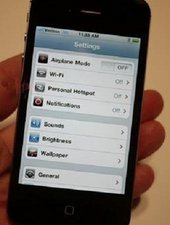
1. Open any application. For this example I will use Settings.

Block Image

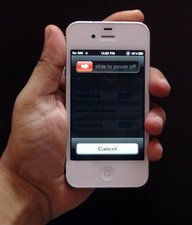
2. Hold down Power Button till display shows the Shutdown screen. Like image below.

Block Image

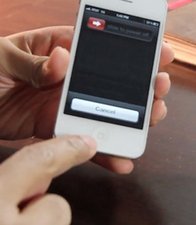
3. Now let go of Power Button and then start to continuously hold down the Home Button until the "Slide to Power Off" screen disappears. Be patient, eventually it will return to the Home Screen. It may even take between 1 - 2 minutes.

Block Image

That's it. Now test by opening any application and then pressing the Home Button to return to Home Screen.

If you need something more visual to follow try this YouTube video.

http://www.youtube.com/watch?v=FMLF1eVur...

Good Luck.

(Images courtesy of Google Images)

0

Score

Avatar
freogardeneroffice
1

Answered

PermalinkHistory

Worked first time +++

0

Score

Avatar
Ase
1

Answered

PermalinkHistory

there are some suggestions here:

http://appletoolbox.com/2012/01/my-ipads...

0

Score

Avatar
John K leeman
1

Answered

PermalinkHistory

After trying all the software resets and putting up with assistive touch for a week I tried the below posted above. Did it a couple of weeks ago and worked for me! But only did it cus my phone was out o warranty and apple wanted over £100 to fix.

http://applecor.info/how-to/a-z/85-iphon...

0

Score

Avatar
Rafael Custodio
1

Answered

PermalinkHistory

Thanks Deano, you saved my home buttom !!!

0

Score

Avatar
oto
1

Answered

PermalinkHistory

hey.. i had this problem until i came across ezekiels proposal its awesome.. thnks again man if not of you i would have spent a little fortune on that..

0

Score

Avatar
Neal Bolam
1

Answered

PermalinkHistory

For me it was an issue with dirt being stuck underneath the unresponsive/non-working iPhone home button.

Silly as it may sound it was resolved with a simple toothbrush. There's a bit of a knack to it, instructions below;

http://nealbo.hubpages.com/hub/Fix-a-bro...

0

Score

Avatar
umesh
1

Answered

PermalinkHistory

Martin! You are amazing dude! I took my phone to the Apple store twice, to a 3rd party guy once - and all of them said I need a new phone.

I decided to give your method a shot, and guess what! it fixed the iphone home button completely!

Way to go dude! Thanks!

0

Score

Avatar
umesh
1

Answered

PermalinkHistory

Sorry, that was for Ezekiel

Add Your Answer