2

Score

Avatar
Eric Perez
35

Asked

MacBookPro does not power up on AC power or battery.

History

I've noticed a number of "My Macbook Pro won't turn on" posts here, but my symptoms seems to be different (read: worse) than the other posts that I've read, such as this one.

Here's what's going on:

I have an A1226 15" MacBook Pro (mid 2007) with serial number: W872218YX92. I can't get it to turn on; whether it's plugged into the AC adapter or on a battery, I get no visible or audible response from the machine when I push the power button--none of the lights turn on, none of the fans spin, etc.

I've read about the nVIDIA 8600GT issue, but I don't get any response from the machine at all, so I'm not sure if that's what the problem is. The other thing I've read could be at fault is the 'Left I/O' board', but this thing wont turn on when using AC or a battery. One thing I haven't tried yet is to open it up and check the top cover power switch; is the power switch something that frequently breaks?

Lastly, when the MagSafe adapter is plugged into the machine, the LED on it always glows green--whether or not the battery is plugged in. When the battery IS plugged in, the 'charging' LEDs on it do not light up or blink and thus the battery does not charge.

Edited by: Eric Perez ( )

Product Image

MacBook Pro 15" (Model A1226) Left I/O Board

Includes MagSafe power, USB, and audio ports — 6 available at 119.95 each.

Post Answer

4

Score

Avatar
Victor Clausson
79

Answered

Accepted Answer

PermalinkHistory

Make sure you have the right power supply. MacBook Pro's uses 85W power adapters.

MacBook and MacBook Air uses 60W power adapters. That's why my MacBook Pro didn't start.

You can find it out by looking at the power adapter.

I figuered it out by multiply the voltage with the current, like this for example:

V = 16,5V

A = 3,65

16,5 x 3,65 = 60,225W so it's was a 60W adapter I was using.

Which was the wrong type of adapter.

All of the Apple chargers are marked with their wattage, look on the plug side side panel. Granted, it's hard to read as it's a very light grey print on the white case, but it's there.

Dan,

3

Score

Avatar
victorclausson
37

Answered

PermalinkHistory

Hi!

I'm having the exact same problem after reflowing my logic board.

But I found a way to always make it boot.

- Unplug the battery.

- Unplug the magsafe power cable.

- Hold down the powerbutton for about 10 sec and continue to do that.

- While still holding the powerbutton down, insert the magsafe power cable and hold it for another 10 sec.

- Release the powerbutton after those 10 sec and make a "normal" press as if you would normally

turn on your computer.

If that doesn't work then try to remove one RAM memory and switch places and do the method that I told you.

Woohoo! It worked,finally! I knew about the ten second thing after you take the battery out, but I never tried it the way VictorClausson described (thanks man!). I was pulling my hair out because I knew there was no reason for my mbp not to boot up just because I didn't have the battery in. Now I'm just keeping my fingers crossed because I'm hoping those 'nice' folks at the Apple store will replace my swollen battery for free. It looks like a 50-50 chance, based on my research.

Drummergirl,

Mr. @Victor Clausson's answer worked & iam able to start Macbook Pro with 60 w adapter. Thanks a lot. Krishna

Krishna Moorthy,

WOOW...I had the same problem that I couldn't turn on my mac at all. I tried what Victor Clausson said and now it is working..Thanks a lot Victor!

Ami,

Hello All, I just wanted to follow up with everyone and post the solution that worked for me. I just noticed @Victor Clausson's answer today, even though it was posted a few months ago, but what he's describing was exactly the issue I was running into. I was using a 60W MacSafe adaptor from my 2011 13" Macbook Pro to try to power the machine in question on. Since the battery was completely dead, 60W was not enough to start the machine up. Once I used an 85W MacSafe adaptor, the machine powered up fine.

Eric Perez,

Thank you Victor. Got my Macbook Pro powered again when I thought I had killed it. Your tip to disconnect battery, hold down power button, reconnect power cord etc. worked. Thank you so much. -Peter

Peter Bentivegna,

2

Score

Avatar
mayer
148.7k

Answered

PermalinkHistory

The very first thing I would do is to reseat the Uppercase cable to the logic board as your machine does not seem to be getting a start signal. Check your battery for swelling. Do your restarts without the battery in. MacBook Pro 15" Core 2 Duo Models A1226 and A1260 Upper Case Cable Replacement

Thanks for the fast response. I took the top case off and tested the power switch by closing the contacts under the switch and also closed the ones at the end of the cable, but still no response from the machine. I even tried unplugging the monitor, DVD, and HD cables, but that didn't change anything.

Eric Perez,

Remove the battery and AC adapter. Press the power button for 10 seconds. Attach the magSafe and try to start (no battery).

mayer,

Sorry for the delay is responding. I tried doing what you said, but it still doesn't respond. There's something seriously wrong with this system.

Eric Perez,

With the battery dead and getting nothing when trying to power on, I would replace the magsafe board first.

mayer,

1

Score

Avatar
lemerise
17.3k

Answered

PermalinkHistory

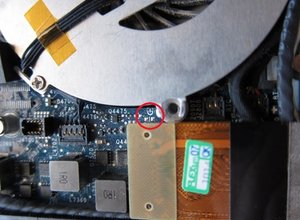
Remove completely the top case (unplug it) and try to boot the machine directly from the logic board. Search for the power icon (same as the one on your power button) on the logic board, near the icon there should be two small solder pads. Just briefly bridge the two pads with a small jeweler flat screwdriver (ac adapter must be connected). If the machine power on then your top case power button could be faulty, if not then the DC in board (or the logic board) could be the problem.

Here's a pict from a macbook logic board. Search for the same power icon on yours or PWR letters.

Block Image

Add Your Answer