0
Score
Asked
LCD compatibility iMac 17"
Are the LCDs interchangeable from a G5, Core Duo, and Core 2 Duo 17" iMac? I am looking for a replacement for my grandfather's 17"1.83GHz Core Duo. It is displaying dozens of vertical lines and has a distorted almost inverted color scheme (almost dead LCD)
3
Score
mayer
148.3k
Answered
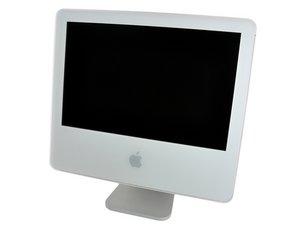
These things are very picky as to which LCDs they will use. The picture you put up is a G5 but the question says it is a Core 2 Duo. Look on the bottom of the stand for the correct one.
Next, there's a possibility that this old machine is one that has a screen recall on it. Go to Applications > Utilities > Grab application and take a picture of the whole screen. Now move that picture around using your mouse and determine it the lines are present in the picture or just on the screen.
2
Score
remacberli
7.5k
Answered
The LCDs on iMac G5 and the early Intel iMacs do look exactly the same, even the electrical connectors are the same (LVDS is a standart after all) and the inverter boards are identical but they are NOT interchangeble!
One panel is labeled LM171W02 (TL)(B2) and the other LM171W02 (TT)(A1).
Unfortunately i can't remember which one is which. But i think a little google might help.
If you fit the G5 panel (i think it's the A1) into a CoreDuo or Core2Duo the machine will refuse to start.
0
Score
Answered
becuase of the EEID. swap EEPROMs and itll work fine. You have to remember Apple has always been up to their dirty old tricks since day 1 of the operation. (proprietary, closed system, etc..) kinda like IBM was.
usually, some, if not all, have EEPROMS that tell the video BIOS/GPU what the panel model/type is, the max resolution, etc. known as the EEID. there is a dedicated EEID bus. some machines use it, some do not. The purpose for a machine to use an EEID is if the motherboard is used in several different display configurations. If the EEID is not used, usually its becuase of the motherboard only working with 1 screen type or resolution.
Apple is the same way, but they DO use the EEID. But, against us. the EEID reads back LM171W02(TT) (for a g5 isight), the mac will boot. anything else, the mac will not.
This goes for most if not all of them. You can swap out the eeproms that contain the EEID, and it will work fine. the system will see a TT panel even though your using a TL. vice-versa.
you can use 3rd-party panels the same way, as long as the resolution matches, etc.
Edited by: Mike Bates ( )
0
Score
mazlum
1
Answered
0
Score
bugra
1
Answered
This is really annoying. I have a core 2 duo 17" imac and have the same problem at the screen. Lots of vertical lines. The LCD is dying, and there is no replacement panels out there. 20-24" LED displays are approx. 150 EUR, but 17" LCD can not be installed so easily.
Are there no other options than installing the original LCD to this mainboard?
0
Score
Answered
+1 for the "how to swap the eeprom" or how to rewrite/flash this thingy. Mike, thanks a lot for your extensive explenation. We would really appreciate if you could reveal the secret if it is, and if, how it is possible to make the one panel work on the other machine.
Regards,
/macchanger
Edited by: macchanger ( )
The EDID EEPROM is small TSSOP chip on the board of the lcd panel, it is usually not very far from the video cable connector. What Mike did (as far as i am aware) is swap the chip from 2 different TMDS panels in order to trick his G5 into using a non-standard but otherwise fully functional panel. That being said he swapped TMDS to TMDS, not TMDS (G5)to LVDS(Intel). TMDS to LVDS cannot be done without actively converting the signals. Unfortunately i have yet to see a converter that would fit in the limited space afforded in the iMac. But in the case of G5 to G5, that EEPROM can be swapped from board to board with success, it involves some pretty serious soldering though(its small, and overheating can destroy it). Using an i2c programmer it can actually be programmed in place. If i get some time i will dig out a couple panels and post the EDID dumps, so if someone wants to program it they wont have to bother dumping the original screen.
0
Score
ned flanders
11
Answered
Hello !
I have an Intel iMac 17" 2 GHz with the corrupted display. LM171W02-TLB2 Color LCD. There is only correct image on the right half of the screen, the other half is filled with vertical stripes.
I got a screen LM171W02-TLB1 according to experts this reference does not require modifications.
Screen boot in gray, then it appears Apple and a small circle below Apple, to stop the movement of this circle screen will to sleep (black) and I have not found how to wake her up.
The only way to make it work is to boot with the old screen and once the system has booted, replacing the old screen with the new and works perfect.
But when you restart the iMac does not maintain the display parameters and returns to go to sleep.
I need urgent aid !
Thanks
Ned F.
Additional data:
Last login: Mon Mar 25 21:40:03 on console
Macintosh:~ nedflanders$ ioreg -lw0 | grep IODisplayEDID | sed "/[^<]*</s///" | xxd -p -r | strings -6
LM171W02-TLB1
Color LCD
Macintosh:~ nedflanders$
Hardware information:
Model name: iMac
Model ID: iMac5, 1
Processor name: Intel Core 2 Duo
Processor speed: 2.0 GHz
Number of processors: 1
Total number of cores: 2
Level 2: 4 MB cache
Memory: 2 GB
Bus speed: 667 MHz
Boot ROM version: IM51.0090.B09
SMC version: 1.8f2
Serial number: QP7070.........
ATI Radeon X 1600:
Chipset model: ATY, RadeonX1600
Type: display
Bus: PCIe
PCIe channel width: x 16
VRAM (total): 128 MB
Manufacturer: ATI (0x1002)
Device ID: 0x71c5
Revision ID: 0x0000
ROM review: 113-xxxxxx-139
The EFI driver version: 01.00.139
Screens:
iMac:
Display type: LCD
Resolution: 1440 x 900
Depth: 32-bit Color
Integrated: Yes
Core Image: Hardware-accelerated
Main display: Yes
Duplicate: off
Online: Yes
Quartz Extreme: Compatible
Display connector:
State: There is no connected screen

