
2

Score

Avatar
nancy
35

Asked

Nano keeps turning itself off

History

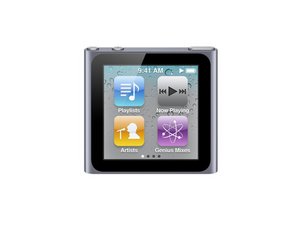
I have the 6th generation Nano and it keeps turning itself off after playing music for about 2 minutes. Battery shows charged and good to go. I turn it back on and resume the song that was playing and it goes for about 2 minutes and turns off again. I have looked on Apple's website and others for answer to this problem but have not seen any questions pertaining to this problem. Any ideas?

Edited by

I took the ipod to Apple and they are replacing it. They could not find the reason it was turning itself off. They figure it is just a flaw in the internal programing. Thanks for all the suggestions.

nancy,

nancy, great that you got it going, now all you have left is to accept the answer that helped you to resolve your issue. This way we know your case is closed :-)

oldturkey03,

Thanks so much for all the help everyone.

nancy,

I had the same problem - i have returned it and had it replaced - and my brand new replacement is doing the same thing.

scott shilling,

I just got replacement and it did the same thing. Then I pushed the ear plugs in all the way and it WORKS! Weird how something like that would make ipod shut itself off. When I took it in to Apple you would think that would have been the first thing the guy would have looked at. Finally I have touch screen ipod that actually works. Now, I have to figure out if I like it or not.

nancy,

Show 2 more comments

Post Answer

7

Score

Avatar
Michele
99

Answered

Accepted Answer

PermalinkHistory

Yes when pusing in the head phones they have to click, no shiny part should be showing.

Yep tried that too, no luck

nancy,

Boy, am I glad that I found this forum. My I-Pod Nano would turn off after a minute. All I had to do is push the headphone jack all the way. Thanks so much.

Monty,

thanks for this,I had same problem would turn itself off after about 2 mins while listening with headphones and now that I have read this and pushed plug right in it works!! You would think the apple service person I sent it to would have thought of this when I said the headphones were playing up!!! Having never had an ipod I didn't realise you had to click it right it, sounds logical now that I know. Cheers

Pauline,

Thanks for this. I just got my nano and I thought maybe one of my kids got a hold of it and ruined it or something! I looked everywhere for troubleshooting support on this issue and found nothing on Apple's website!! How ridiculous is that??!! I couldn't get the radio to work, either. It said I needed to plug the headphones in all the way, but I thought I had. I was literally planning on taking this thing back to the store tomorrow morning until finding this discussion board. Thanks!!

iCole,

Thanks - I had the same problem. It did not turn off though if connected to the computer via USB. Push the plug right in which is not obvious and it now works without shutting down.

RonC,

Show 30 more comments

3

Score

Avatar
Margie
37

Answered

PermalinkHistory

Make sure your headphones are pushed all the way in.

It was and still it turned itself off.

nancy,

I swear I did this on the first nano I had but it did not work. But on my replacement nano that seemed to have done the trick. Go figure.

nancy,

i was experiencing the same problem. i pushed the headphones in all the way, felt a click, and now it works just fine! well, it works so far... :-) christie

ChristieC,

just make sure your headphones is plugged all the way!mine was doing the same thing and i just pushed them all the way,so now there is no more issues

alinka,

Same problem here lol I had to push the headphones in hard, my headphones are too big as well :(

Jacqui,

Show 8 more comments

2

Score

Avatar
Devon
25

Answered

PermalinkHistory

if you look closely at your head phone jack you will notice the he phones aren't all the way inn to you half to push them all the way you will hear a pop and the sound causality will be better

Thanks for that, trying to be to gentle but forced the jack in all the way and its done the trick, Marvelous many many thanks.

Frog,

My brand new 6th Gen Nano also does the same. In addition the earphone jack is tempremental and loose. There is no lock button and the off switch is in such a stupid place. Everytime you need to adjust the earphone jack you end up turning it off. Taking mine back for a refund as it is a really bad piece of kit. Should have learned my lesson with Apple after buying the original first gen ipod with a battery that lasts for about 2 hours. In my experience their products suck.

Rotten Apple,

As Devon suggested, pushed the earphone jack in till it clicked and that seems to have done the trick with the supplied earphones. Thanks dude! However I still stand by my comment on the off switch and lock button. Unless someone can advise otherwise! Maybe they should have designed the off switch to be a dual lock switch? Now just need to find out if I can get on with its functionality. PS: Sound quality is top notch.

Rotten Apple,

BTW now sussed out the way they have designed the lock feature. Getting better......guess I should really read the instructions more carefully or just actually read them........... Sorry Apple.......but still annoyed about my first gen ipod!

Rotten Apple,

0

Score

Avatar
Carol Perreau
1

Answered

PermalinkHistory

I had same problem from new nano at Easter, no amount of pushing in the headphones properly fixed it. Apple replaced it no problem and the new one was fine until yesterday. (August)

We have tried several different sets of headphones & a speaker with the same result; as soon as the backlight goes out, the sound stops. I left it all day without unplugging the headphones then when my electrical engineer son turned up tonight, it played ok.

I'm sure that this is some intermittent fault that Apple know about - hence the ease with which Apple will replace the units.

0

Score

Avatar
Greg
1

Answered

PermalinkHistory

I just had this problem from a 6G that I received at christmas. The headphones were indeed ALL the way in, tried that several times no luck. Tried getting an update, but am on O/S 1.2 (most current version).

Was about to go to the apple store when I remembered that I had another pair of earbuds from an old iPod, tried the old earbuds...problem solved.

For those still having issues, make sure to try another set of headphones before heading out to the apple store :)

weird, i have the same problem, why is that, why can't they make it work properly right away?

yeah,

0

Score

Avatar
Nikki
1

Answered

PermalinkHistory

I've been having the same problems, and realized that the headphones were not completely plugged in. Now it works. Such a simple thing.

Glad I googled this question.

Thanks everyone.

0

Score

Avatar
KJW
1

Answered

PermalinkHistory

Thanks so much Nancy. I read your latest about pushing in the ear bud plug. I though I had it in all the way, but didn't. All's perfect now. Thanks!

Add Your Answer