3

Score

Avatar
FeKo
49

Asked

iPod white screen after repair the screen.

History

Hey Guys...

My ipod touch 4g screen was broken and i fixed it but now my screen is white... First i thought it is the white screen of death but it isn'n.. then i tought the new screen doesn't work but it works on another ipod .. please help me :(

Edited by: oldturkey03 ( )

omg that is exactly what happened 2 me thank u 4 having this questionn!!!!!!!!!!!!!!!!!!!!!!!!!!!!!

amy,

Post Answer

20

Score

Avatar
mayer
150.7k

Answered

Accepted Answer

PermalinkHistory

While holding the home button down and volume up button, push and hold the power off button and hold that until you see the apple sign.

If the iPod will not turn off, try to reset it. Press and hold the Sleep/Wake button and the Home button at the same time for at least ten seconds, until either the Apple logo or battery symbol appears. If the battery symbol appears, continue to charge iPod touch until it is fully charged.

That failing doa restore, here's how:

http://support.apple.com/kb/HT1414

Edited by: mayer ( )

This link "http://support.apple.com/kb/HT1414" worked for my Ipod Touch 4g. Thank you soo much.

Paul Rokitjanski,

mayer, Thank you! I recently opened my ipod to fix the home button problem, and I was trying to return the LCD plug back in and all I got was the white screen of death! I didnt know what to do! I thought it was the plug, but when I reset it, everything was back to normal! thank you

erorp Crazyfish,

mr. mayer you are the man! muchisimas gracias.

hugo Santiago,

I would like to thank MAYER, you saved my butt. I replaced the screen and got the white screen and MAYER'S instructions worked, that is, holding the 3 buttons together. This is my third screen replacement for the 4th gen and it doesn't get any better. I meticulously remove the old adhesive and lay the new adhesive down and when I lightly sqweeze the top and bottom corners or sides I get screen distortion. I'd sooner replace the iPhone 3g/s or 4g any day.

Joe in PA,

Mr Mayer you are the best it works again thanks for all the tips relay helpful can you tell me why i keep losing the camera after screen replacement is there a trick what is the purpose of the small spring near the camera thank you

ygal,

Show 4 more comments

5

Score

Avatar
Country Computer Service
2.4k

Answered

PermalinkHistory

I wanted to ask an answer, then post an answer, but, don't think I can do that so...

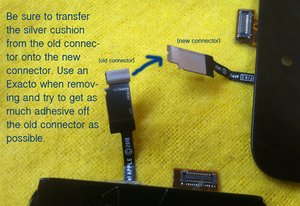
After you remove your old screen look on the tip of the thin video cable and you will see what looks like a little aluminum/mesh cushion pad. Some manufacturers are shipping replacement screens without this pad and without it you will get a white screen.

Carefully use an Exacto to scrape the old one off, try to get as much adhesive as you can when your working and note the orientation and which side the adhesive is on. Place the cushion on your new screen and hook it up.

I got a dozen screens in from a manufacturer and was scratching my noggin thinking why is the old screen working and all the new ones white when I discovered this little nugget. :)

Update

@phil, here is a photo to clarify.

Block Image

Update

I had the same issue last night, thomas. I did run into one bad screen, but, finally, I hooked up the original and got the video back then disconnected and added another screen. It was white, but, after doing the Home/Power combo a couple of times it came on. Something to consider. And check on the board to make sure you haven't bent or torn off one of those tiny pins on the video connector -- I worked one once and accidentally broke one off, ugh, had to use a 20x loupe to notice it.

I try to keep a couple of those cracked, but working screens around to double check that it isn't an issue with the replacement.

Update

IT COULD BE THE PART

Just a note, I've been ordering replacement screens from a wholesaler and have had lots of issues. I've got 4 sitting on the shelf that I tested and all have a white screen.

I can use an old screen and no problem, switch to the new screen from the wholesaler and get stuck on the white screen...even after several resets, powering down etc.

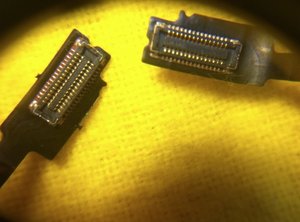
I plan on calling them tomorrow, dunno if it makes a difference, but in this photo you'll see on on the left is the connector for the new screen which leaves me with a white screen and the right a connector from an old screen which works fine. You could be having the same issue.

Block Image

Edited by: Country Computer Service ( )

John, that would be a great fix. Do you think you could post an image with your answer?

oldturkey03,

@oldturkey03 just closed up shop at 4am about an hour ago, I'll post a pic either this afternoon or Saturday afternoon when I'm back at work.

Country Computer Service,

I started a discusson about what parts to move over from the broken screen: http://www.ifixit.com/Answers/View/55811... and wanted to comment on this bracket thing as It always is a hassle transferring without bending it/losing glue etc. @Garry suggested to leave it and after many repairs i agree. Just be sure to cover all contact areas with the 300SLE adhesive. I now get perfect contact every time. Thanks for pointing out the pad and for the photo @John. I just pinch this pad off the old screen and it stays sticky.

asle,

Hi, read johns answer to iPod touch 4gen white screen , I was wondering John could you send me a picture of the little silver stripe you were talking about. Regards phil

Phil,

Hi Jon, obviously mine has gone in the bin, is there any other thing I could use as a replacement ? . Kind regards phil

Phil,

Show 3 more comments

2

Score

Avatar
Chad
175

Answered

PermalinkHistory

I had this problem a long time ago and never found an answer that worked for me...I just had an iPod Touch 4G last week do this after an LCD change, and I fixed it. I had another one do it today, and was able to confirm a fix

Here is what I did:

1)while PLUGGED INTO COMPUTER, hit power/sleep to blacken screen (if it is already black, toggle through white screen and then back to black)

2)press home button in and hold, immediately press in power/sleep and hold

3)hold until Apple logo appears, release

2

Score

Avatar
steve
35

Answered

PermalinkHistory

I would agree with all the solitions above. Always try the reset , re-seating lcd connector options first.... And of course if you swap the screen and a new one works then of course you know the first screen was faulty.

IF ALL of those things fail and you know the screen itself is not faulty then one thing that worked for me was:

Using a magnifer (20x binocular if possible) look at the area to the right of the lcd connector on the mother board - with the lcd itself disconnected. There should be a row of tiny components in a vertical line between the right hand side of the connector and the ambient light sensor (the one with the foam sponge around it). The 2nd component up should be a little black resistor. I had accidentally knocked mine off whilst prying up the lcd connector.

I bridged that missing resistor by applying some solder across the 2 pads and when then lcd was re-connected the white screen was fixed. That was a year ago & the ipod has worked fine since. Ideally you would get a resistor the same size & resistance , but I didnt have access to smd reworking-type equipment. So far so good!

You definitely need that magnifier-preferably stand mounted so you have 2 hands free to do the soldering underneath.

I just want to add that I have never received the white screen issue when replacing the screen with a cheaper $20 screen from ebay. Steve made a good point about watching the small parts to be sure you are not damaging something while trying to plug in the screen. If you are getting a white screen after a repair you are probably unplugging the screen while the ipod is powered on. That is the only case I have ever gotten the white screen when the LCD plug came loose while I was testing it and the screen went white. After a quick reset it worked fine. For those who are having other issues, like Steve noted you likely broke something or detached something while doing the repair. There are so many fragile parts you must be very slow and careful to make sure everything is taken apart and replaced correctly.

David Gr,

0

Score

Avatar
Mike
13

Answered

PermalinkHistory

I replaced a cracked screen.....after connecting the new one and before closing up, everything showed up fine.....then all of a sudden, white screen. I plugged into iTunes but it was password protected. I actually punched in the code, guessing where the numbers would be and it worked! So, everything seems to be there in the white screen. I've tried 2 different screens with the same result. Quadruple checked connections, tried restoring and the hold the buttons method. Nothing but white. What confuses me is why it was fine at first then all of a sudden white screen. I don't think I did anything wrong....I've done about 8 repairs before without this problem.

This is not a problem with the digitizer but the LCD connector. Check if it damaged like mine was where a pin was gone of the connector: https://www.dropbox.com/gallery/943721/1... Look at the picture LCD_connector_ipodtouch4g. I also had a similar problem when exchanging 3 screens did not give me any picture. This iPod Touch 4g I gave up and was in my drawer for 3 weeks. I one day connected it again just being bored and voila, it worked again. Very spooky but it has since worked perfect. I know this may be of no comfort but miracles can happen. This Touch 4g is a spooky thing...

asle,

0

Score

Avatar
asle
1.8k

Answered

PermalinkHistory

Many good feedbacks but his problem is a white screen and that usually has nothing to do with the digitzer but with the LCD. So resetting in any ways will help. If not there is no simple solution to this. I have had success with unplugging the LCD connector, spraying contact spray on the connector and reseating the connector.

0

Score

Avatar
Cooper Luce
1

Answered

PermalinkHistory

Both my sister's and mine had cracked, so I replaced hers first (waiting on a battery replacement, not using hers a a guinea pig) and it worked like a charm with no conflicts. Mine, however, should have been a much easier replacement because of the way it broke, but instead I got this white screen. I did a hard reset by holding sleep and home and it worked after a bit. Here is the video I did it from:

http://www.youtube.com/watch?v=dgcmZa5dC...

And for anyone wanting to know how to revert the firmware, here is a website with the downloads (tested and works - at least it did six months ago):

http://www.felixbruns.de/iPod/firmware/

Simply plug in your device and hold shift and press restore, a dialog box should appear asking you for the file location, select it, and it should work.

0

Score

Avatar
David Gr
1

Answered

PermalinkHistory

Does your old screen still work at all? If so you could plug in the old screen and see if it still works, if it does then your screen is probably bad. Make sure you have the plug snapped all the way in also, I have seen some only snap down on one side (just enough to power the lcd).

Some people have also claimed to have success by letting the battery run dead and then recharging it. I have never had to use this method so I am not sure if it works or not.

One last thing to try is resetting it again, sometimes you may not have hit the buttons just right and the reset did not take place. I just replaced a screen yesterday that I had to try 4 times to get it to reset (I accidentally hit the power button while the lcd was unplugged and got the white screen).

Hope this helps you a little bit, good luck.

0

Score

Avatar
Pablitox
1

Answered

PermalinkHistory

you must do a hard reset. press power button and home button at the same time during 10 seconds.

0

Score

Avatar
ronkowch
1

Answered

PermalinkHistory

I had 2 LCD's go white screen after I tried replacing a cracked screen. I believe my problem was that I did not power down the IPOD Touch properly before I installed the new LCD. Damage to the LCD and Digitizer occurred when power was still present while connecting the new LCD. After letting the power completely drain from the IPOD Touch, I installed a new LCD/Digitizer and this solved my problem. Make sure you power down (hold the power button and swipe to power off) your IPOD Touch before removing and installing a new LCD/Digitizer.

0

Score

Avatar
Trent
1

Answered

PermalinkHistory

Sometimes this is a software issue, and will resolve itself when the battery dies.

0

Score

Avatar
Linda
1

Answered

PermalinkHistory

I was having the same problem with the white screen after replacement. I tried four screen with no luck. I finally got it to work by watching this video on youtube. It was my problem and it could be yours if nothing else works. Here is the link

http://www.youtube.com/watch?v=JYpBgcHSx...

0

Score

Avatar
mathew
1

Answered

PermalinkHistory

I had this same problem and i just spent 10 minutes trying to find you my solution. I remember the site that helped me fix mine http://www.kindredcone.com but they haven't tagged the article properly and i can't find it this time. If you have a look i know it's in there. I accessed the site from Google, you can try that also. Just type in your problem. But try the site first, maybe I'm just brain dead and can't think how to find it properly with the right keywords.

0

Score

Avatar
Craig
687

Answered

PermalinkHistory

I recently repaired an ipod touch 4th gen and I guess I damaged the lcd board connector while installing the lcd connector and got the white screen. I inspected the connector and noticed a pin had been damaged so I resoldered the bad pin and it worked great afterwards.

I had the same problem. Look here: https://www.dropbox.com/s/2sxpgiij5eluwo... You must be pretty good at soldering;-) I would never be able to solder things like that!

asle,

0

Score

Avatar
Spoon
1

Answered

PermalinkHistory

i have to this display problem ...but im have display problem , i try with another display and now is ok ....i

0

Score

Avatar
jude
1

Answered

PermalinkHistory

Hi, I am having the white scree issue after screen replacement too. I noticed that I tore the little black sqaure pad near the camera, (the light sensor area?). I watched the video that helped Linda, and it seems like that area is my problem, but for the life of me, I cannot see where he soldered to make a connection! Does anyone know of a better picture of this area and where the solder needs to go to make this connection?

0

Score

Avatar
Linda
1

Answered

PermalinkHistory

Jude, if you go back to the video and pause it on 7:53 that will probably help you see it better. Looking at the screen the light sensor is on top, we want to look at the bottom row of components. If you start on the bottom right going to the left, the component missing is the second to the left. It's suppose to look like the third component on the bottom. I hope i was able to help you on this. Linda

Jude, I forgot to mention that you are suppose to put some solder down to make a bridge. It is really hard if you don't have the right soldering tip. I did mine with a stencil cutting tip, it was the only one that i could find that worked for me. I used 60/40 rosin-core solder. The first time i did it i used a bigger tip and i got solder on another component by accident. The white screen was gone but the microphone has some static noise. So i redid the work with the smaller tip and made sure that i didn't touch any other components and guess what the ipod works perfectly.

Linda,

0

Score

Avatar
jude
1

Answered

PermalinkHistory

Linda, Thank you!! I'm going to give it a try today...I'll let you know how it goes:)

0

Score

Avatar
Adam Walsh
1

Answered

PermalinkHistory

I have found no problem with any of the pins with a magnifying glass, everything seems to be perfect, the ipod works fine with another LCD but for the life of me I can't get this red digitizer LCD to display anything other than a white screen. Tried a hard reset, everything. Is it a bad screen, or am I missing something?

0

Score

Avatar
rlarajr
1

Answered

PermalinkHistory

I had a similar problem yesterday with an iPhone 4 screen. After i replaced the screen and turned it on, the screen e was white. You could see the apple and the apps, but the digitizer would not function. I luckily had ordered two and tested the second one and it worked perfectly. I suspected it might have to do with a damaged clip from the first installed screen. Couldn't find the problem with the white screen.

0

Score

Avatar
David
1

Answered

PermalinkHistory

Steve, I would like to confirm the missing resistor near the LCD connector , thank you so much .

0

Score

Avatar
jmarrero
1

Answered

PermalinkHistory

One more case to create a white screen issue. From my point of view, if not solved by previous sugestions (holding buttons, reseting connectors, draining battery), the cuase of the white screen is a open circuit.

While replacing the screen it will be necessary to bend the circuit board to connect the new screen. In my case I did not noticed that the flex cable controlling the volume and power button was broken.

After replacing the cable a assembling all the parts, the white screen work perfectly.

In some cases I had also short circuit the battery connectors with the home button, and the ipod came to life again.

Has anybody gone through a similar scenario and/or solutions ?

My advice, checks all components twice.

JM - Montreal

0

Score

Avatar
zuzuram
1

Answered

PermalinkHistory

Replacing the screen on te second ipod 4th gen I got the white screen... Got the first advice...connecting to iTunes. Windows 7 installed the drivers, like it was a new device and the iTunes asked to restore from backup. I did, the white screen dissapeared and got the apple. Cool, thanks guys!!!! Not I'll try for the 3rd one (got 3 kids). If anything happens I'll update....

0

Score

Avatar
megas xlr
1

Answered

PermalinkHistory

i put the new screen on and got the white screen so i put the old screen back on and white screen i tried the home and power button about 4 times and still white i looked and looked for a answer and the only one left i see is to let it die then plug it in to charge it and people say that work got any ideas please tell me the new screen i got was white but had a big black spot on it like it got crushed in the package so im sending it back and getting another one but my old one is still white hopefully i can find a fix before the new one comes in

Add Your Answer