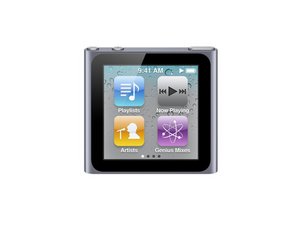
How do I turn off voice over?
I turned on voice over and it is not turning to a different page.How could I fix it?
Is this a good question?
Score
6

Rep: 73
 2
2
 2
2
I turned on voice over and it is not turning to a different page.How could I fix it?
Is this a good question?

Rep: 782.3k
1.1k
893
 2.3k
2.3k
It is my understanding that you turn off VoiceOver by disabling theoption in iTunes and then re-sync the iPod.
and here is some more good stuff from Apple
To turn off VoiceOver on iPod nano using VoiceOver gestures
1. Swipe right or left with two fingers until you see or hear Settings.
2. Double-tap to open Settings.
3. Move your finger up or down the screen until you see or hear General, then double- tap.
4. Move your finger up or down the screen until you see or hear Accessibility, then double-tap.
5. Move your finger up or down the screen until you see or hear VoiceOver, then double-tap. You'll hear "VoiceOver off" to confirm the setting. Now you can use standard gestures to control iPod nano.
http://support.apple.com/kb/HT4317 Good Luck and let us know if it helped
Was this answer helpful?
thank u it helped a lot!!!!
thank u !!!!!!!!!!!!!!!!!!!
thank u soooooo much!
THANK YOU SO MUCH!
you helped me a lot!
God Bless you!
Thank you so much!!!!!
Muito Obrigada!!!
(Rysia Ellen, Brazil)

Rep: 13
1
This has been a wide spread problem. Apple is very well aware of it even though they may not offer this information to you. I have had 2 ipods with the same problem. Many Many folks have documented this problem and it is all over the internet. Unfortunately, I have had to move away from the Apple ipod. Bummer for Apple. Very frustrated.
Was this answer helpful?

Rep: 13
1
I did turn off voice over, and turned off speak hints, and it still never shuts up. Never. I have to reboot it, my ipod plays for a few songs and then the %#*@ voice over starts all over again and has to interrupt my song every two seconds.
Was this answer helpful?
EXACTLY my experience too.

Rep: 13
1
I am having this problem with my ipod nano - in settings it says voiceover is off but it still talks over songs randomly (one in every ~ 3 or 4 songs). I've gone in and "returned" it off, I've reset the ipod, I've turned it on and then turned it off, I've re-set again, I've turned off all "speaking" settings, I've tried changing the speed......etc....still no luck :( I realise that this is a useful feature for vision impaired but I'm going to bin my ipod if it doesn't stop and definitely will not be getting another!
Was this answer helpful?
have you solved this problem if yes how?
Rep: 533
4
2
1
Have you try rebooting the nano?
Hold down Volume down button and the sleep button until it reboots.
I would give a try connected to the Mac or PC.
Hope that helps. Good luck with that.
Was this answer helpful?

Swipe Left with two fingers Srongley! you will do this untl you get to settings then to Voice over then turn it OFF hahah and by my i never tiuch that agian hahah
was in same position as you
Was this answer helpful?

Thank you so much... It helped.
The two finger swipe should be strong.. it works.
Was this answer helpful?

Thank you so much for this, you are an absolute star!
Was this answer helpful?
Past 24 Hours: 0
Past 7 Days: 1
Past 30 Days: 10
All Time: 44,551
