
0
Score
Mark RCS
1
Asked
Home Theater: Creating an alternative Kinect extension cable?
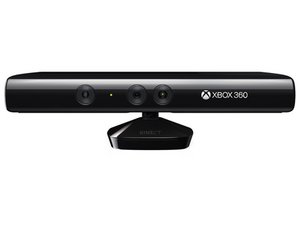
For people who have a flat panel TV on a wall and an equipment rack on the other side of the room, the new Microsoft Xbox Kinekt will be creating many headaches, including what to when you cannot retrofit a Kinect cable in the wall between where the TV sits and where the XBox console is.
The Kinect appears to use a standard USB 2.0 plug.
Does anyone know if the Kinect can use a USB 2.0 cable as an extension or is their wiring proprietary?
In a case where there is spare spare Cat5/6 wires between the rack and the TV, can a USB 2.0 to RJ-45 extender/adapte
2
Score
Answered
1
Score
Steinwayma
13
Answered
Unfortunately, there is not a cheap solution to the USB problem. I have read that it require a USB 2.0 extender. The cheaper extenders are only 1.1 compliant. I have ordered this extender, and was told that it should work:
http://www.blackbox.com/Store/Detail.asp...
I will end up paying almost as much for the extender that I did for the XBOX and Kindle! This may be the price to pay for home theater convenience! Sigh!
UPDATE: I got the extender delivered, and it works perfectly!
Edited by: Steinwayman ( )
1
Score
David Gogel
13
Answered
I got something similar to Steinwayman from usbcable.com
They are absolute experts on USB and this was the best solution they had for my home theatre system. It works perfectly and although it is not cheap it is what i needed to get it to work correctly. Plain USB extender cables worked like junk.
Here is the link
www.usbcable.co
1
Score
heman22uni
13
Answered
This is the cheapest solution i have found USB to Ethernet like David and Steinwayman have said. Monoprice is a good company.
1
Score
Ryan
13
Answered
For you guys looking at expensive solutions.MS has there own for $50. Sure you can find an aftermarket for cheaper.
1
Score
oldturkey0
91.2k
Answered
The "usual" USB cable consist of only 4 wires Very simple. Maximum length of cable is about 5 m for AWG20 and 0.8 m for AWG28 cable.
1 USB Vcc (Vbus) usually RED, wire should be 20-28 AWG
2 USB Data - usually WHITE, wire should be 28 AWG
3 USB Data + usually GREEN, wire should be 28 AWG
4 GND usually BLACK, wire should be 20-28 AWG
USB D+ and D- are twisted in cable. Outer shell is made of copper braid and aluminum shield.
Colors do not mean anything in the wiring scheme. You can use any color wire to rig something. Just make sure the colors match from end to end.
the Kinect does not use standard USB as is evidenced by the wiring diagram http://www.ifixit.com/Answers/View/39624... take a look at it and it will show the difference. There are extension cables out and you can get them from places like this one http://www.gamestop.com/Catalog/ProductD...
hope this helps....good luck
Edited by: oldturkey03 ( )
1
Score
Answered
1
Score
huangchi
13
Answered
The Cable Extension for the Xbox 360® Kinect™ Sensor will allow you to extend your connection by 9 feet, allowing you to place your Xbox 360® Kinect™ Sensor virtually anywhere in your living space. The Cable Extension is great for all but will best appeal to consumers with large living spaces and entertainment centers. This design has been inspected and approved by Microsoft.
Edited by: oldturkey03 ( )
1
Score
Flyer292
13
Answered
**Tested and works GREAT!!!!**
32ft USB 2.0 Active Extension Cable - $18 from TigerDirect (got my business discount and paid only $12 lol)
Sabrent CB-USBXT USB 2.0 Active Extension Cable - A-Male to A-Female, 32-ft
0
Score
Cervera
1
Answered
Hi,
From what I understand, Microsoft Kinect uses a standard USB interface.
USB uses 4 wires: 2 for data (+,-) and two for power (+5V,GND).
the problems with using the cat-5 are as following:
- maximum total length for USB2.0 to work is no more than 5 meters (at least that's what the standard recommends)
- connections need to be shielded to prevent noise, so cutting and using duct-tape with a long cable may make the connection unreliable.
So, if the cable is short enough and if you have tools like a clamp for ethernet heads (RJ-45), my recommendation would be:
- put standard RJ-45 sockets on both sides of the cat-5 cable
- get a short USB extender and cut it in the middle
- clamp an RJ-45 head on each exposed side of the extender







