2
Score
Asked
No Service after Teardown :/
I had completed the teardown of the iPhone 4 but I am stuck with No Service even with an activated ATT SIM card... Does anyone know where I might have messed up in the process because the phone works perfectly except for it can't make calls or texts because of no service... Thanks
Edited by: Taylor Arnicar, machead3, and rj713 ( )
3
Score
bushing
4k
Answered
Accepted Answer
There is no antenna cable on the iPhone 4; the outer metal band acts as the antenna. The "antenna" is connected to the logic board through the mounting screws!
Check the mounting screws, especially the ones near the battery connector (that's where the GSM radio is). If any are missing, replace them; if not, you might try tightening them if they are loose ... or loosening them if they are tight! (The tightness of the screws can slightly change the tuning of the circuit.)
Does WiFi / Bluetooth work?
5
Score
gareth williams
109
Answered
i have found the problem :)
the little silver connector which most people think is for the speakers is actually for the antenna, its the thing under the battery plate (the first thing you unscrew when you disassemble the iphone )
IT HAS NOT CLICKED IN PROPERLY !
THANK YOU!!!!! Gareth Williams was right on for my fix too. Someone mentioned that calling it an antenna cable is misleading- I don't know what the official name for it is, around the web that's what people are calling it. We'll call it the "magic cable" so as not to offend certain folks much more brilliant than I am;) I had No Service most of the time to a brief span of weak service (the magic cable was most likely touching the right spot but not plugged in). The magic cable runs in between the battery pack and mic/speaker assembly. It is actually built into the mic/speaker assembly and this loose cable plugs in to the round slot right next to where the battery pack plugs in. The end of the magic cable has a round metallic plug on it that can be tricky plugging back in. THANKS GARETH and IFIXIT for this awesome resource!!!!!
no!!!!! there is a silver connecter beside the battery connecter that one is for 3g not the screws. the screws are for gps/wifi/blutoo
I'm also with Gareth Williams on this one. I replaced an iphone 4 glass today and after putting the phone back together and "damaging" the small round connector that is at the end of the cable that is attached to the main speaker near the dock connector, I had no Cell Phone signal. This connector had to be it. I then manage to repair the damage I had caused to ir using a pin and connecting the it back up. There, I had 3G signal again. It had to be for the 3G antenna. iFixIt states that it is for the WIFI in one of there repair manual but I did try the GPS and the WIFI while the connector was unhooked and no issue with either of these. One last thing, the small round connector is attached to the speaker and if you follow the contacts, it leads to the bottom left corner of the phone (when you are looking at the phone from the front) and the is where the whole antenna gate issue happen. It has to be the lead for the 3G antenna.
3
Score
Rob McKinney
37
Answered
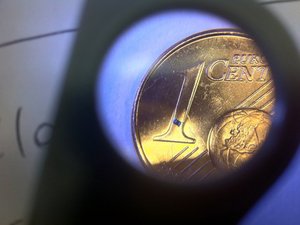
Yep, that's the one dianthabrazzell - I had the same problem, noticed that the (very very tiny) fuse (or resistor?) was loose and when I inspected, it fell off.. (I still have it) but I used a very strong magnifying glass and a soldering iron to reconnect.. Wasn't easy.. The Circuit Writer Pen sounds handy for jobs like that.. so once I reconnected it I got my 3g back.. I think it was even a little better than before.. not sure what that component does but at least it's not essential..
Update
..apparently, it's an inductor?
Edited by: Rob McKinney ( )
2
Score
Tony
25
Answered
I myself am having a hard time getting the iphone 4 back up and running. I replaced the bottom black portion which contains all of the parts needed for reception. I still cannot get service, I got service for 3 days and then went to searching and no service repeating. I replaced again and got a brief 3g symbol which disappeared quickly. I have cleaned all contacts,from oily fingerprints/sm
Please help!
2
Score
Answered
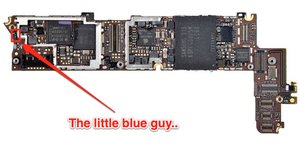
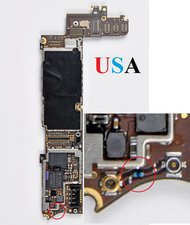
Ok. If you have checked the round connector and are sure it's on properly, then here is what is most likely the problem: It's the "little blue fuse" as mentioned above. Even if it is still there and hasn't been knocked off, it probably got touched or bumped loose. If it is still in place, touch it with a screwdriver or something. It most likely will then fall off. Don't worry, that's exactly what you want. Now here's how to get your signal back:
Get a Caig Circuit Writer pen. (I got one at Radio Shack). Follow the instructions on how to use it. Practice on a piece of paper. When you feel comfortable that you can get a small dot out of it, touch it where the blue fuse thing was. Just enough to connect the two dots that it joined. Now let it dry over night. Put your phone back together the next morning and you will have your 3G signal back! That's it. I was without service/searchi
Thanks "dianthabrazzel
Ulf,
2
Score
tony tony
71
Answered
For anyone that replaces both lower dock connector and the black speaker/mic box. If you have no service or searching for network then the black speaker/mic/rad
I just spent an hour figuring out why my friends iphone wouldn't work after we replaced these 2 parts.
I ended up putting in my iphone 4 black speaker/mic/rad
0
Score
jakellis
1
Answered
The answer I ran into while repairing a phone for a client:
After tearing the phone apart and reassembling it a few times, I asked the client and they did not have cell service turned on. I could verify it by removing and re-inserting the sim card. It would show bars briefly, then go back to No Service.
Woops! If you're doing this for someone else, make sure you ask!
0
Score
Answered
I just had this issue and read this thread, and several others, before taking my phone to someone else for repairs. I cracked my screen on my black 4g and had it replaced with a white front and back. After it was replaced my signal read searching and 'no service' unless i was driving or in an apple store apparently. I normally get great service at home and at work but now i was getting a 'no service' message. I tried all the resets, restoring from a backup, and anything else you can think off for a software solution. Apple gave me a new sim card and told me they couldnt touch my phone or send it in and give me a replacement for $150 unless my phone was back to its original state. My phone was also now missing the silver netted piece that goes over the speaker on the face of the phone (the one you listen out of when your talking on the phone). My home button is also still black, so its obvious my iPhone has been repaired. I found another person (the person that fixed the screen and the guy that fixed the signal were both found on craigslist) that repairs iPhnes and I explained the different possible issues and when we popped the back off the blue wire was not fastened or 'clicked' in place. Once he got the blue wire connected everything was back to normal on my phone. He even replaced the netted piece missing from my speaker. Now my phone is factory new, and white with a black button thought my bumpers still have wear).
Bottomline, i think this 'no service' message is an isolated issue. I believe it shows for many reasons, and even phones that apple repair and refurbish experience damage in the process that apparently isnt detected before sending these phone out to customers. Regardless, if you have an iPhone on a wireless contract and your experiencing this problem my advice is to take the phone to apple and have them replace it if you still have it under a warranty (i got my black 4g iPhone with the firsy batch in 2010 so my phone is no longer under warranty, which is why they said i could pay $150 for a replacement IF my iPhone was in its oringal form). You can do that OR find someone thats a knowledgable iPhone repair-man that can take your phone apart and examine each of these possibilities. He charged me $20 to connect that blue wire and replace the missing piece. There is no one answer for this general problem. Have your phone looked at or buy a new one. GOOD LUCK! -message sent from my new screen, white front and back, black home button, worn down bumper-having iPhone-
Southern Cali resident
0
Score
Answered
Ya I had that same broblem no service, serching
When you hook the batter up with the small screw next to I there's a small cable unplug that cable and make sure is really plugged in there good. It kind of pain in the ##$ getting it plugged in there right but that should solve the ploblem that cable powers up the antenna of the phone.
I was having the same proble with my phone when I change the battery it would say Serchig and no service.
When you plug the batter to the phone with the little screw theres a small cable on the left side of the battery plug in. Unplug the cable or make sure the cable is plugged in there good it can be a pain in the $%^ getting it plugged in there but that should fix your proble. That cable powers up the antenna if that cable is not plugged in there right you will keep getting the no service/serchin
0
Score
Sonny
1
Answered
0
Score
Answered
0
Score
dan
1
Answered
it is more than likely the little blue antenna coil (no more than 1mm in size) highlighted in the photo in the previous answer. this happened to an idiot "friend of mine" who changed his screen with the instructions on this site (ok it was me).
perfect instructions to change the screen from this site but didn't see any advice about just how fragile that coil is. so after pulling apart my phone and reassembling it four times (was jipped into just buying the digitiser screen before realising you need that and the lcd as the lcd doesn't detach, then getting a faulty part) i knocked the coil off.
if you aren't electronics savvy and aren't confident of putting in a new one yourself you can do what i did.
i used a circuit pen and put a tiny dab of conductive silver bridging the connecting points where the coil are and now the phone has perfect reception again (actually seems stronger than before). you can get one of these pens from any hobby electronics store.
good luck
-dan
0
Score
Erik
1
Answered
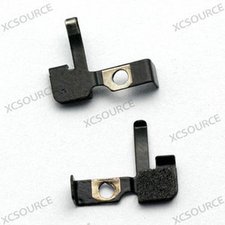
It is crucial that the 3G antenna bracket is mounted back in the right order.
I am talking about this part (the image attached).
This is the order it should be reassembled:
1. Iphone motherboard
2. Speaker housing with 3G antenna (which _alot_ of people think is the Wifi-antenna) (bottom of the Iphone 4 anyway...)
3. The 3G antenna connected to the motherboard (the small round cable)
4. The 3G bracket (the part in the image attached)
5. The battery contact cable
6. The correct screw that keeps things in place.
Enjoy!
Also, clean metal parts with something like Windex.
0
Score
rg6
1
Answered
0
Score
Rob
1
Answered
Just replace a broken screen on the ip4, after putting it all back together I also got "no service" after reading this forum I found that I had not attached that tiny wire that comes off the speaker housing. It is very tricky to reattach it, but after 10 mins of gentle manipulation it went back on. It doesnt snap on it kinda just sits on top of the hole. The place it needs to go is right next to the screw hole just beneath where the battery plugs in. Hope this helps
0
Score
johnw
1
Answered
Everyone had useful suggestions. I am a 10 year certified Mac Tech, so I know when I screw something up, or when it just isn't working.
I replaced the LCD panel on a couple other 4's and 4S's, and never even considered these problems or had these issues.
after replacing the LCD panel for a family unit here in Japan, I got the "No Service" issue. I rechecked the screws, and found some out of place loc-tite that probably wasn't helping, and the little blue inductor was okay.
But "No Service" presisted.
Reboots did nothing. location did nothing. Reset network settings did nothing. The phone was restored (to iOS6) before screen replacement, so that wasn't the issue. Maybe it was the SIM swap.
Then, I remembered my wife had disabled 3G briefly one time, and it resulted in "No Service" for her phone here. So the "3G" switch resets the cell connection, either the radios or the handshake between the phone and the carrier. My knowledge is fuzzy, but it certianly effects the connection when that switch is slid.
I went to Settings => General => Cellular and turned "enable 3G" to OFF. then slid back to ON. Instantly connected after that. Placed a call 10 seconds later.
So try the "Enable 3G" slider, after you have checked your screws.
Good luck fellow screw turners!
0
Score
alan
1
Answered
hi,
i have found the solution to this problem.. i had 3 iphones 4 n 4s to repair today.. after replacing lcd and changing battery.. all of them had searching bar only.. n couldnt make phone calls.. i changed and made modifications on the board but nuthin helped.. turns out that all we need to do is a CLEAN RESTORE THROUGH ITUNES..
see if this post wrks for u.. cheers
alan
I also got this problem, Does Any one who can upload a pic to help me out? Which mounting screws? == Update == any one solved this problem?
Y L,
Any updates? This is the same problem I have after replacing the lcd screen. Wifi works. Youtube doesn't want to connect either. == Update == Any updates on this?
Quan Lin,
This is a great thread, I'm having the same problem, but neither my service, wifi or Bluetooth are working, I'm going to try this tmrw and I will let you guys know how it goes. Keep up the good work, best info I've found after searching the web for nearly 2 days :) P.s. my little blue inductor seems to be ok, so am gonna do a full tear down and build it back up first, to see if the problem can be solved without messing with the inductor. Wish me luck :) Danny
Danny,