3
Score
Harinder
37
Asked
No Service iPhone 3G issue
Hi,
I am seeing No Service on my iPhone 3G for past few days.
This is what i did till now-
1. Erase all data on iphone.
2. Reinstall IS 3.0
3. Jailbreak and Unlock it with Redsn0w and ultrasn0w.
5. Reset network settings
6. Airplane mode ON > OFF several times
7. Disable 3G
8. Reboot several times
9. Tested SIM in another phone and another iPhone, works OK
10. Modem Firmware- 04.26.08
Sometimes i see mu providers name for few second with zero bar and then again No Service.
Please help.
Thanks,
Harinder
3
Score
markus weiher
22.9k
Answered
had the iphone a fluid damage or was it dropped ?
the problem is most likely a connection problem
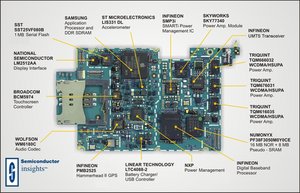
i would first look at the golden spring and the whole lower quarter of the logic board (everything whats on the left side of the picture)
2
Score
pacul
25
Answered
Hi everyone,i thinck that maybe help http://img189.imageshack.us/img189/4586/...
Where is the squere you must fractute line.
The other way is maybe this http://www.reperatorium.pl/Alle/frct.jpg
I try the second way and it works.Wish succes
Pic of broken little 'capacitor' on mainboard: http://hoogvliegers.airpool.nl/downloads... Similar to that one: http://img189.imageshack.us/img189/4586/... I don't understand the second pic. Didn't you have to cut the line there, too? http://www.reperatorium.pl/Alle/frct.jpg
2
Score
ashstids
25
Answered
0
Score
James Bond
131
Answered
The WIFI antenna is in the upper part of the phone - the Cellular antenna is at the back of the dock connector assembly! They have nothing to do with each other.
I found a great tutorial on the net. Maybe it will help you!
"How I recovered my iPhone's lost GSM signal!"
http://www.mauron.net/iphonerepair/
---
And I found that suggestion on CNET:
"ok here we go the problem is with a small piece of copper sticking out from the mainboard of the iphone 3g believe it or not, not the antenna not a blown chip a small lick of copper which has to rest snugly on the metal bezel ring surrounding the phone, that's it!! i know what you're thinking that is not possible right your do no remove screw is still in place your phone was never open before, put away all your cynicism, look carefully at the small piece of copper if just a quarter is on the metal bezel that is not enough a full half has to rest snugly to the bezel you can either solder an extension or remove the do not remove screw altogether (i had to remove mine) it now has full 5 bars no intermittent hide and seek with the signal, lol."
Edited by: James Bond ( )
You did a lot. Did you pay your bill?
mayer,