5

Score

Avatar
rousp
1.9k

Asked

iPhone 3G keeps losing signal/service

History

Problem:

iPhone 3G loses signal randomly and for no obvious reason, everything else works just fine.

Circumstances:

  • Until a few days ago the phone has never been dropped. Then it was dropped from about 1 meter, twice...
  • The phone is just over 1 year old

Tried:

  • Waiting
    • Nothing..
  • Rebooting
    • Brings service back for a while
  • Activating and deactivating flight mode
    • Brings service back for a while
  • Re-seating sim-card
    • Brought back service initially, but didn't solve problem

Theories

  1. Loose cable?
    • I don't see how that fits in. I mean, re-booting gets the service back. If it was a loose cable it shouldn't help to re-boot..
  2. ??
  3. My observations indicate that the phone is only ever on 3G network. Could the problem be in or around the UMTS chip?
    • Considering logic board replacement or contacting someone doing BGA soldering.

Update 1

Yesterday I changed the whole dock assembly to see if that could fix the problem.

Today it lost connection again. So it didn't work.

Now I'm considering to get a new iPhone or doing a logicboard replacement on this one.. Also I could find someone local that does BGA soldering and ask them to find the chip that has to be loose on the logicboard...

Either that or I'll decide that I can't afford it because I just bought an iPad....

I also added a third theory.

Either way, thanks again for all your help and comments!

Edited by

if the phone logs onto anetwork - how long will it keep the service until it looses the connection again?? - does it also happen when the phone lies on a table, at the exact same spot as before ?

markus weiher,

The phone stays connected for a very varied amount of time. From 10 minutes to a few hours. It loses connection in my pocket as well as laying on a table. I can't guarantee that it was in the exact same position on the table thou.. But I'm off to bed now, late here. So it will stay in the same position for the next few hours.. Responding to any comments or answers in the morning.

rousp,

right it's late here in europe (00:21) ;-) - i think the problem could come from a antenna problem or a contact problem (maybe some bga soldering connection problem)

markus weiher,

Let's hope it's not a bga solder at least.... I've just decided that I couldn't afford the new iPhone, being a student... But, why would a contact problem be fixed by re-booting or the flight mode thing?

rousp,

The contact problem could be "minimal" and if the phone comes to a not that good covered area - it simply looses the connection. but it could also be a hardware issue and the phone isn't able to "sync" the service settings that it receives from the BTS (base transceiver station) - and that is one possible point where a phone get's kicked from the network

markus weiher,

Show 5 more comments

Post Answer

5

Score

Avatar
markus weiher
20.7k

Answered

Accepted Answer

PermalinkHistory

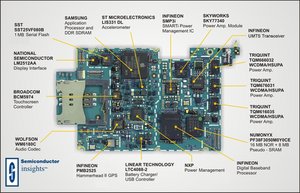
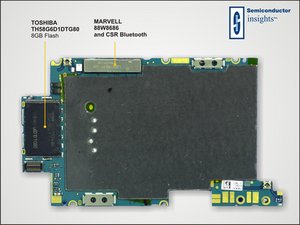
sorry to answer that late (ok, it's 05:42am ;-)) - i think it's a connection problem - so, yes - open it again and check all the connections, search for broken parts in the area around the "do not remove" sticker

Block Image

CLICK for a HUGEer version of the picture

Block Image

CLICK for a HUGEer version of the picture

check both sides - the circuits around the golden spring are for the antenna - so if there is a problem - it might lead to those problems. surely - the antenny could also have a problem, but it's not an antenna in the regular way - normally - it fails because of a bad connection

Hi again. For my curiosity and, perhaps, your interest. The problem could seem to be related to finishing conversations/data sessions and/or being in ares with a bad signal. This strengthens your suspicions, right? Or have I not understood something... =P

rousp,

you got it right ;-)

markus weiher,

The last few days my phone have acted more and more like a shrunk iPad. So I tried opening it today. Didn't see anything broken. But I didn't dare to remove the shields in order to access the inner logic board.. And that's probably where the fault is.. However, I'm accepting your answer. You shall not suffer for me not daring to open the logic board.. Thanks for your help!

rousp,

i'm not suffering - the whole helping is sometimes also some kind of learning for me

markus weiher,

Show 6 more comments

1

Score

Avatar
Matty t
13

Answered

PermalinkHistory

make sure the sim tray is flush with the top of the phone and that the aim card isn't bent

Update

sorry sim card isn't bent, I had this problem with a 3G it kept droping 3G signal then turning off then saying connect to I tunes then no service. I took out the sim card and the tray blew down the hole in the phone put sim back in and it has sorted my problem hope this helps..

Edited by

0

Score

Avatar
jaybrooks76
439

Answered

PermalinkHistory

I don't have a iphone but have you tried disabling one of the bands and make it 3g only or 1x only?

I just realized that I could do that when I updated. However I can only disable the 3G baseband. When I do so the connection drops within a few seconds. So I think it's safe to assume that the problem lies in the handling of non 3G signal. I just ned to identify the ICE's that processes that signal and find someone willing to check the BGA's for me.

rousp,

right, you can only disable the 3g. identifying the parts isn't the problem - but the "new" ones are pretty expensive. "checking" bga's isn't an option. it might be one of the PA's and in that case, you might not even see anything. if the repair is possible - it could get pricey. if you can provide a "dead" iphone 3g for parts, it would get cheaper - but still - it's not done within a few minutes - those job's can take hours (i know that - i rewired those crappy nand flashes of an iphone 3g)

markus weiher,

Haha, thanks you for your comments. I'm going to take your word for it. I've decided that I can live with the problems for a little while. And I'll look for an iPhone for parts in the meantime. =)

rousp,

0

Score

Avatar
Jacques
1

Answered

PermalinkHistory

iPhone 3G signal always drops out on my phone to the extent of me wanting to throw it at a brick wall!! It's the worst signal ever, Iv heard that the iPhone 3G was fitted with a dodgy antenna which is shielded behind a metal cover which also helps destabilize local signal it makes me sick and very frustrated daily to know that apple released it in that condition and say that they're not responsible for the signal...

Technology, we can't live it..but, we can't live without it!

Peace

0

Score

Avatar
luke
1

Answered

PermalinkHistory

how much would it be to get the soldering fixed? i

and can i buy a part for this and what will it be called thanks?

luke,

luke this question is a year old, no one will be coming back as it as marked as solved. i'd suggest you click on ask a question, give details about what your phone does (how it came to have the problem) and what you have tried to correct the problem. We can then help you more accurately.

pollytintop,

0

Score

Avatar
eenzo69
1

Answered

PermalinkHistory

Try shutting off your 3G connection (you find it under settings, general, network) and rebooting. If that solves it, then it's a software problem. Dunno what to tell ya, cuz I have that problem too but if I kill the 3G, phone gives me no problems. CRAZY!!!

Add Your Answer