@night4cat, exact same problem here - Headphones not detected when plugged in after sleep, same thing when the port is used for line-out or with another headphones set. This is almost certainly a firmware issue since the machine never fails to recognize the headphones after a reboot. It is not physical port damage.
For now the best workaround is to use a USB DAC such as the USB adapter supplied with Beyerdynamic MMX2 headphones, or just reboot. For a real fix I think we will be waiting on Apple for a software update.
Hey night4cat: if you don't know how to measure impedance I strongly recommend you don't do it. Firstly, it's pointless - this is nothing to do with hardware. Secondly, you have a warranty and you should be taking your machine to an Apple authorized service centre if you still don't believe me, not tinkering with it yourself. If you do mess with it, and you create a hardware problem by incorrectly applying meter probes or by some other method, then you will have a hardware problem and you won't have a warranty any more either.
Why is it definitely not a hardware (bad socket or headphone) problem?
1. Reliably occurs after system sleep.
2. Fixed by reboot.
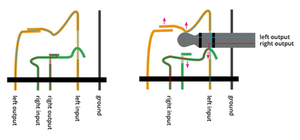
3. Mac headphone jack is also software controlled, it is not a simple analog output controlled by a mechanical switch alone! How do we know this? Look at System Preferences - you can have something plugged into the headphone jack and still direct audio output elsewhere, such as a USB DAC.
Try this also - Play some music through internal speakers. Insert headphone jack while wearing just one earpiece. You will notice that the music does not immediately start coming through the headphones. The switch inside the headphone jack causes the system to mute the output, switch to the jack and then unmute. Same in reverse when you pull the plug, the system mutes, switches to internal speakers and then unumtes. You can even slow this down by running all your cores flat out (encoding video for instance) - this is software controlled, it is not an ancient transistor radio with a simple mechanical switch. There is a switch to detect whether something is plugged in or not but all it does is supply an input to the system, not connect/disconnect the internal amplifier output.
If you have a real hardware problem, like a crackly headphone jack - and you're out of warranty. And you can handle disassembling your machine, replacing a part and then reassembling it, then I'm all for buying parts from iFixit and doing it yourself.
But not when it isn't a hardware problem, and not when this non-existent problem would be Apple's responsibility to fix under warranty (or software update) anyway.


 5
5  3
3  1
1 







8 Comments
I found this same issue on a mac mini, it happens after screen lock or sleep. It happens because the screen the it is plugged into has speakers and is connected via HDMI. when it happens go in to sound preferences and switch back to "headphones"
by ashfinlayson
I have a MacBook Pro early 2011, this has been a perennial problem since the beginning. Restarts usually make it work for a while. I think this is a hardware/software problem. It's not the headphones, or my external speakers--it's the MacBookPro. They've replaced the logic board twice. It'll work for a while and then it won't. What seems to happen is I'll plug the external speakers in and out every day for a couple of weeks and it works. Then it won't work without a daily restart, or multiple restarts every day. This too goes on for awhile. Zapping the PRAM doesn't seem to solve the issue. Occasionally when I remove the plug to the external speakers, the computer sound won't work. This indicates something with the plug in the computer. It's a drag that only people with a problem are the resource for finding a solution.
by w1960july
I was having the same problem and have finally found a way out of it. I tired this on Windows 7. Just go to the Control Panel> Device Manager>Sound, Video and Game Controllers and then just reinstall all the sound drivers; no need to update even! The Sound shall be positively come from the headphones now. Hope this works out for ya'all.
by Rishav Sharma
This is common in Labtops, the headphone jack is probably damaged, it is not an easy fix, the best solution is to just buy a USB headset and use that. It could also be dirty and have lint or dust in it.
by O s
@royalinnkeeper I have the same exact problem. Curious if you were able to solve it?
by Arturo Lopez
Show 3 more comments